Preface
Lexical analysis is the first task a compiler performs. After preprocessing source code, such as removing comments, unnecessary line breaks, and locating included files, lexical analysis decomposes the whole source program into words. These words fall into five categories: identifiers, keywords, constants, operators, and delimiters. This prepares the input for syntax analysis and semantic analysis.
Lexical analysis works on individual characters. Its purpose is to combine those characters into valid words, or strings. The main task of this stage is therefore to build a lexer. There are two common approaches:
- Write it manually. For a specific language such as
JavaScript, we write code by hand and simulate the conversion process according to the language rules. This is complex and error-prone, but it gives precise control over every part of lexical analysis and can be efficient.- Generate a lexer automatically. The process is: declarative specification -> automatic generation -> lexer. The generator accepts declarative rules as input and outputs a lexer. A declarative specification means that we only describe the rules for recognizing character streams, not how to recognize them. The rules are regular expressions. Keywords, identifiers, and integers in C can all be described by regular expressions. These regular expressions are fed into the generator, which produces a lexer, usually a DFA, or deterministic finite automaton. The overall process is: regular expression -> NFA -> DFA -> minimized DFA. If the input code is accepted by the finite automaton, it enters the syntax-analysis stage.
The most famous tools for lexical and syntax analysis are
lex/yacc, along with their successors
flex/bison. They provide language and text parsing
capabilities for many pieces of software. They are powerful and
interesting.
Although JavaScriptCore does not use them and instead
implements its own lexer, the basic ideas are similar.
Data Types
As usual, let’s start with several basic data types used here.
CharacterType
JavaScript has the following character types, classified character by character:
1 | // JavaScriptCore/parser/Lexer.cpp |
JSTokenType
JSTokenType in JavaScript is shown below. Every
JavaScript keyword, arithmetic operator, and logical operator is listed
as a token type. Since there are many token types, only part of them is
shown here.
1 | // JavaScriptCore/parser/ParseTokens.h |
The mapping between the enum and keywords can be found in:
1 | // JavaScriptCore/parser/Keywords.table |
Token
There is also a TokenType enum in the source code. This
type is defined specifically for JSON parsing. Do not confuse it with
the previous JSTokenType. It is not really part of the main
topic, but it is worth mentioning to avoid confusion while reading the
source code.
1 | // JavaScriptCore/runtime/LiteralParser.h |
JSToken
This type is more important. After JavaScript source code goes
through lexical analysis, what we get is a sequence of
JSToken values. It is a compound type:
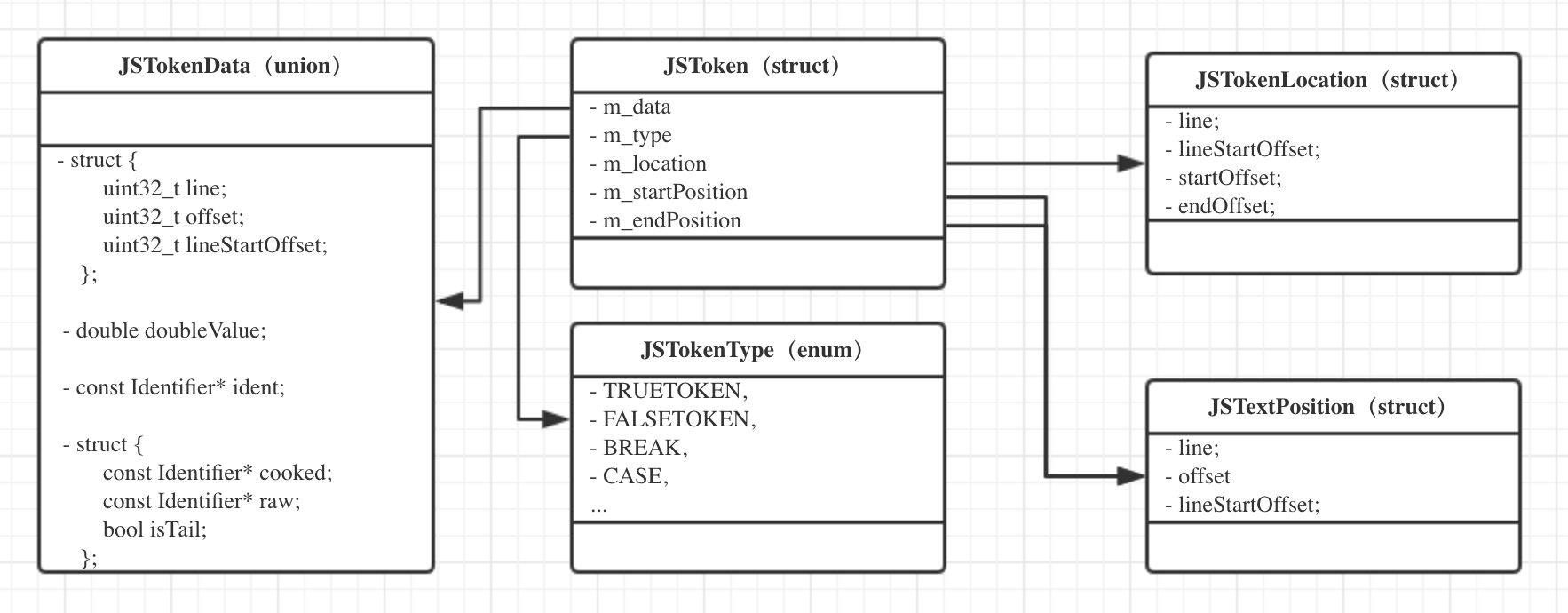
1 | struct JSToken { |
JSTokenData is a union and can store four kinds of
members. Different tokens represent their data differently. For
example:
- A parsed numeric literal can be represented by
doubleValue.- A string may need the first structure.
- A method name or variable name needs
Identifier.
1 | union JSTokenData { |
JSTokenLocation contains the line number, line-start
offset, source-file start offset, and source-file end offset:
1 | struct JSTokenLocation { |
JSTextPosition represents a position. It contains the
line number, source-file offset, and line offset:
1 | struct JSTextPosition { |
Lexical Analysis Process
Lexer Initialization
In the project, the lexical-analysis class Lexer assists
the Parser. The Parser class has a member
variable named m_lexer, and it is initialized in the
constructor:
1 | // Definition. |
Identifier Parsing
It is then called in the Parser method
nextExpectIdentifier. As the name suggests, it returns the
next expected identifier.
1 | ALWAYS_INLINE void nextExpectIdentifier(unsigned lexerFlags = 0) |
The logic lives in lexExpectIdentifier. Some
alert-related code is removed here to keep the flow clear:
1 | template <typename T> |
The point of this method is to open a fast path for identifiers.
Source code contains a large number of identifiers. Compared with
identifiers, keywords, constants, operators, and delimiters are less
frequent. From a probability perspective, when parsing each
JSToken, the result is very likely to be an identifier.
This fast path saves time, which is exactly what the method name says:
the next token is expected to be an identifier.
Core Logic
Apart from identifier parsing, the rest of the core lexical-analysis
logic is in the lex method. The function is long, but the
code and comments show the flow clearly:
1 | template <typename T> |
The code is long, but this is the most important function in this article, so it is not omitted or shortened. Looking at it another way makes the flow much clearer, so it is worth reading together with the diagram below.
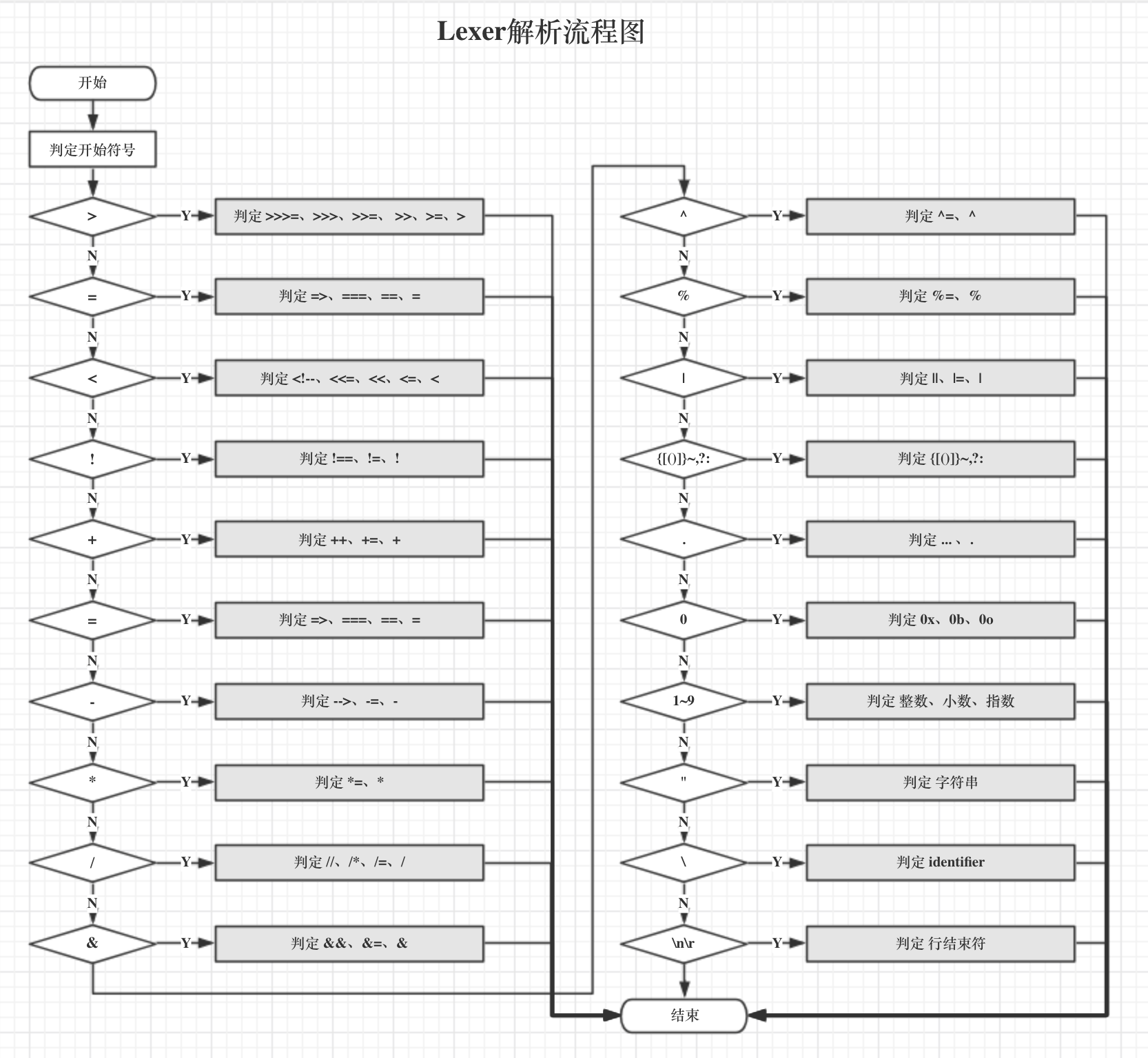
After the switch statement above finishes, a
JSToken has been produced. Most cases are straightforward
and easy to understand, but several important methods deserve a closer
look.
String Parsing
1 | template <typename T> |
The flow of parseStringSlowCase is very similar to
parseString: it handles escape characters, line
terminators, and finally creates an identifier. The difference is that
parseStringSlowCase uses m_buffer16, while
parseString uses m_buffer8.
1 | typedef unsigned char LChar; |
1 | template <typename T> |
After the start position, length, and content of the string are determined, let’s look at how identifiers are created:
1 | template <typename CharType> |
No matter which path is taken, it eventually depends on
Identifier::fromString. This method already touches the
virtual machine. Think about it: creating an identifier must go through
VM-level recording so that later access and repeated processing can
reuse it. This is not a good place to keep digging, or we will get stuck
in another swamp. Interested readers can continue from there.
Decimal Number Parsing
First, look at the DFA for decimal numbers:
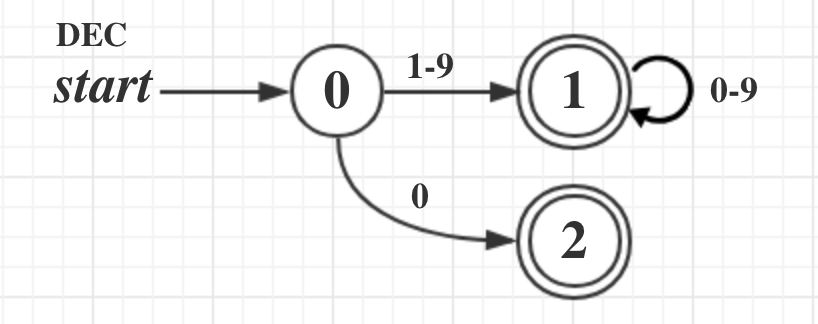
Then the parsed decimal string is evaluated and stored in
returnValue.
1 | template <typename T> |
Hexadecimal Number Parsing
First, look at how a hexadecimal number is recognized:

Then the value of the hexadecimal number is calculated:
1 | template <typename T> |
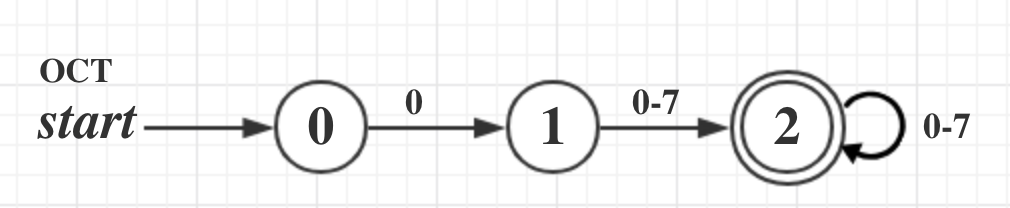
Octal Number Parsing
The approach is the same, so there is not much more to say:
1 | template <typename T> |
Integer Overflow in Arbitrary Bases
Next is the standard integer parsing process. Binary, octal, decimal,
and hexadecimal integers can all be parsed through this function.
radix represents the base.
1 | double parseIntOverflow(const LChar* s, unsigned length, int radix) |
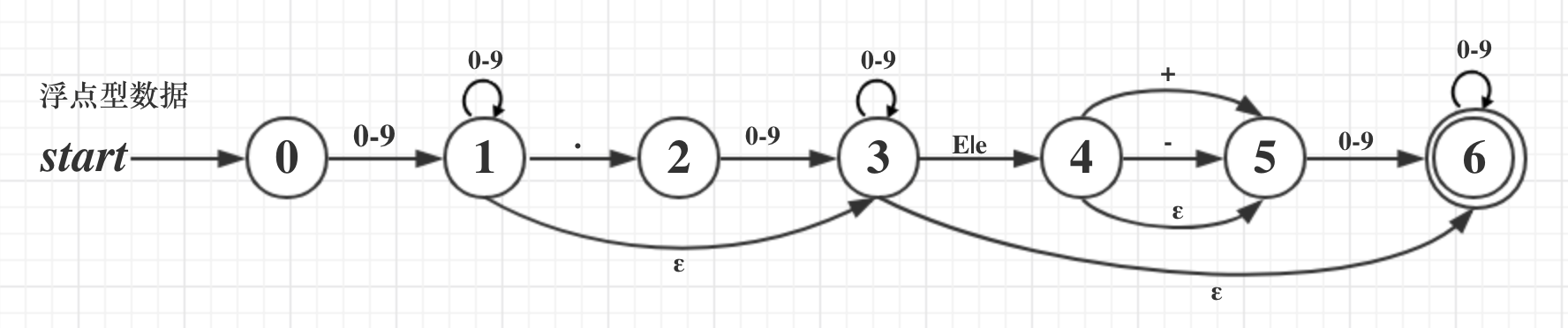
Decimal Points and Exponents
The floating-point parsing process can be represented by the following DFA:
1 | template <typename T> |
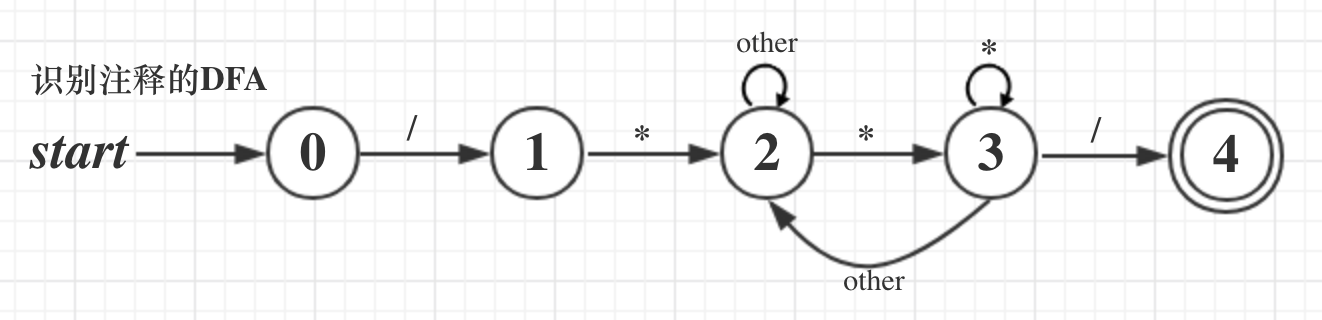
Multi-line Comment Parsing
The DFA for multi-line comments:
1 | template <typename T> |
Example Update
For example, take this JavaScript code. It contains a function, a variable, and a function call:
1 | function test(age){ |
After lexical analysis with Esprima, the following result is produced:
1 | [ |
Summary
After this process, a complete token in the JSC world is produced, and the whole world becomes quiet.

