Background
LLM responses usually arrive token by token rather than as a complete document. Waiting for the final response before drawing anything makes the interface feel needlessly slow.
The client should reveal content as it arrives, but LLM output is
rarely plain text. It may contain Markdown, HTML-like markup, and
formulas; this implementation must handle both HTML and
LaTeX while the document is still incomplete.
How it works
Streaming request
AFNetworking-streaming
adds callbacks for chunked responses. A request receives one
headerCallback, repeated dataCallback
invocations as chunks arrive, and a final completion callback when the
stream closes.
Each dataCallback may contain one or more
application-level records, which the client splits using the delimiter
defined by the server protocol.
1 | NSURL *url = [NSURL URLWithString:@"https://raw.githubusercontent.com"]; |
Pseudo-stream parsing
The parser must tolerate HTML and LaTeX fragments that end halfway through a construct. Rather than maintain incremental parser state, the client uses a simpler pseudo-streaming strategy:
Whenever new streamed text arrives, the parser appends it to the accumulated text and reparses the full content from the beginning.
Incomplete tag rules
At any point in the stream, the buffer may end in the middle of a tag. That is an expected intermediate state rather than a syntax error, so the parser follows a few recovery rules:
- Complete tag openings are parsed, while incomplete openings are
withheld.
<div>is complete even if its matching</div>has not arrived yet.- If the text is
<div>123, the output is123. - If the text is
<div><span>123</span><b>456, the output is123**456**.
- If the text is
<div,<di,<d, and<img src="http://are incomplete openings and remain hidden.
- Leaf nodes can be emitted as soon as they are complete.
In this section, “complete” refers to the opening tag itself, not to the presence of a matching closing element.
Incomplete formula rules
The custom tex element needs a second validation step
because its contents must also parse as LaTeX.
<tex>\frac{1}{2}has no</tex>, but the formula itself is complete and can be rendered.<tex>\frac{2}{</tex>closes the element, but the formula is invalid and remains hidden.
Pseudo-stream rendering
The iOS renderer is built on YYText, which expects a
complete attributed string and layout rather than an incrementally
growing document. Making it truly incremental would require invasive
changes to YYText, so we chose a pseudo-streaming design
instead.
Core idea
The core of pseudo-stream rendering can be summarized in one word: masking.
For a given NSAttributedString, YYLabel
produces a deterministic layout. The renderer can therefore draw the
latest complete layout immediately, cover it with an opaque mask, and
uncover one character cell at a time. Visually, the response appears to
stream even though each layout pass still processes the full buffer.
The first video visualizes the masks for debugging; the second shows the final effect.
The debug view uses a red horizontal mask for the current line and a
blue vertical mask for all later lines. Revealing a character shortens
the red mask by one cell. At the end of a line, the red mask moves down
and the blue mask shrinks by one line height. The loading
indicator stays attached to the leading edge of the red mask.
Note: the mask color must match the underlying view color and must not contain transparency.
Streaming rendering flow
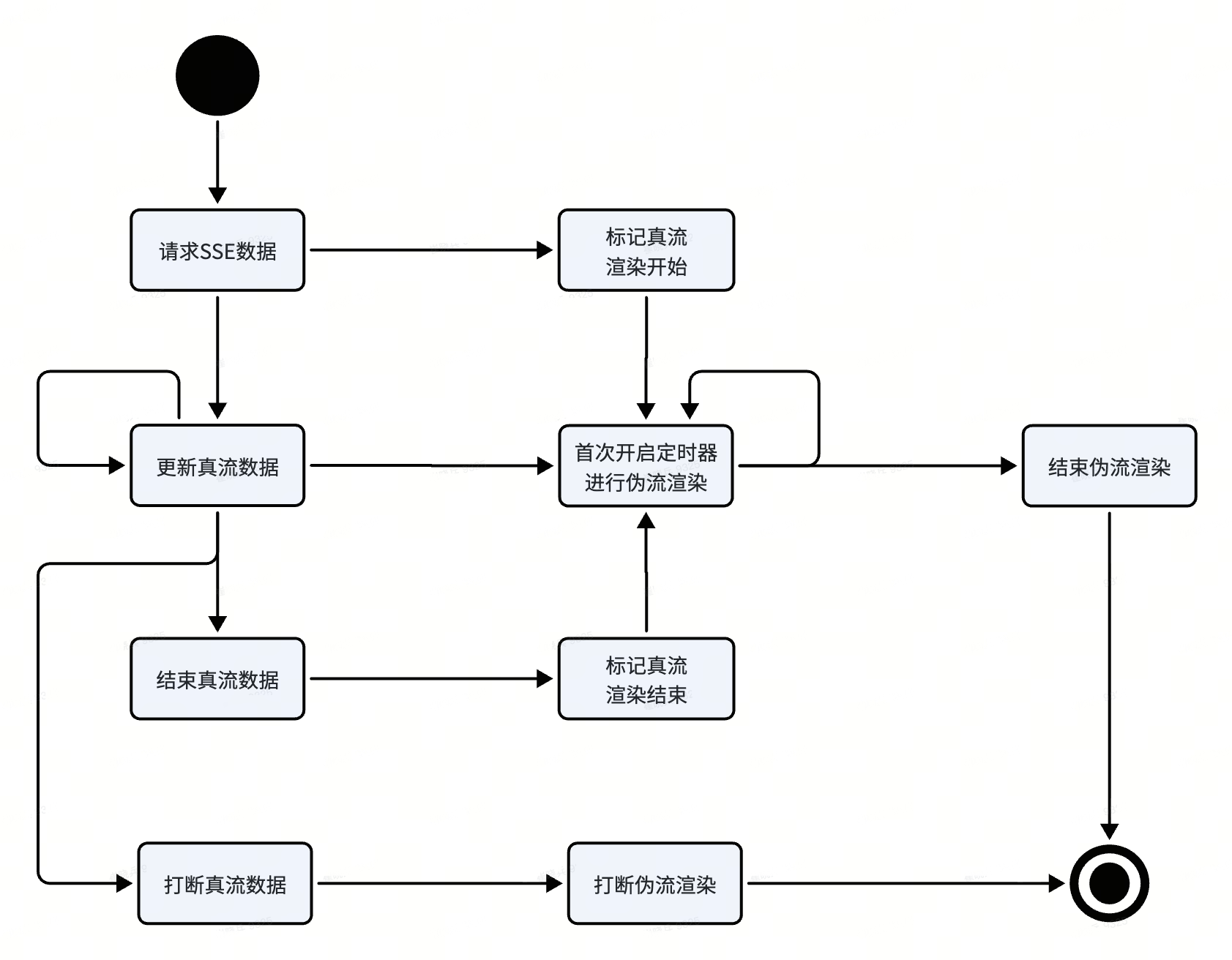
- When the client starts the SSE request, it also starts the pseudo-stream renderer and shows the loading state.
- The first data callback creates a layout and starts the reveal timer. Later callbacks append text to the buffer and prepare newer layouts. On each timer tick, the renderer reveals one more character cell from the current layout.
- The final network callback produces the last layout and marks the source stream as complete. Once the reveal timer reaches the end of that layout, pseudo-streaming stops. If the source is still active, the renderer waits for the next layout instead.
- The caller can also interrupt pseudo-stream rendering explicitly.
The engine stops the timer and appends
......at the current position to show that the response ended early.
Card expansion
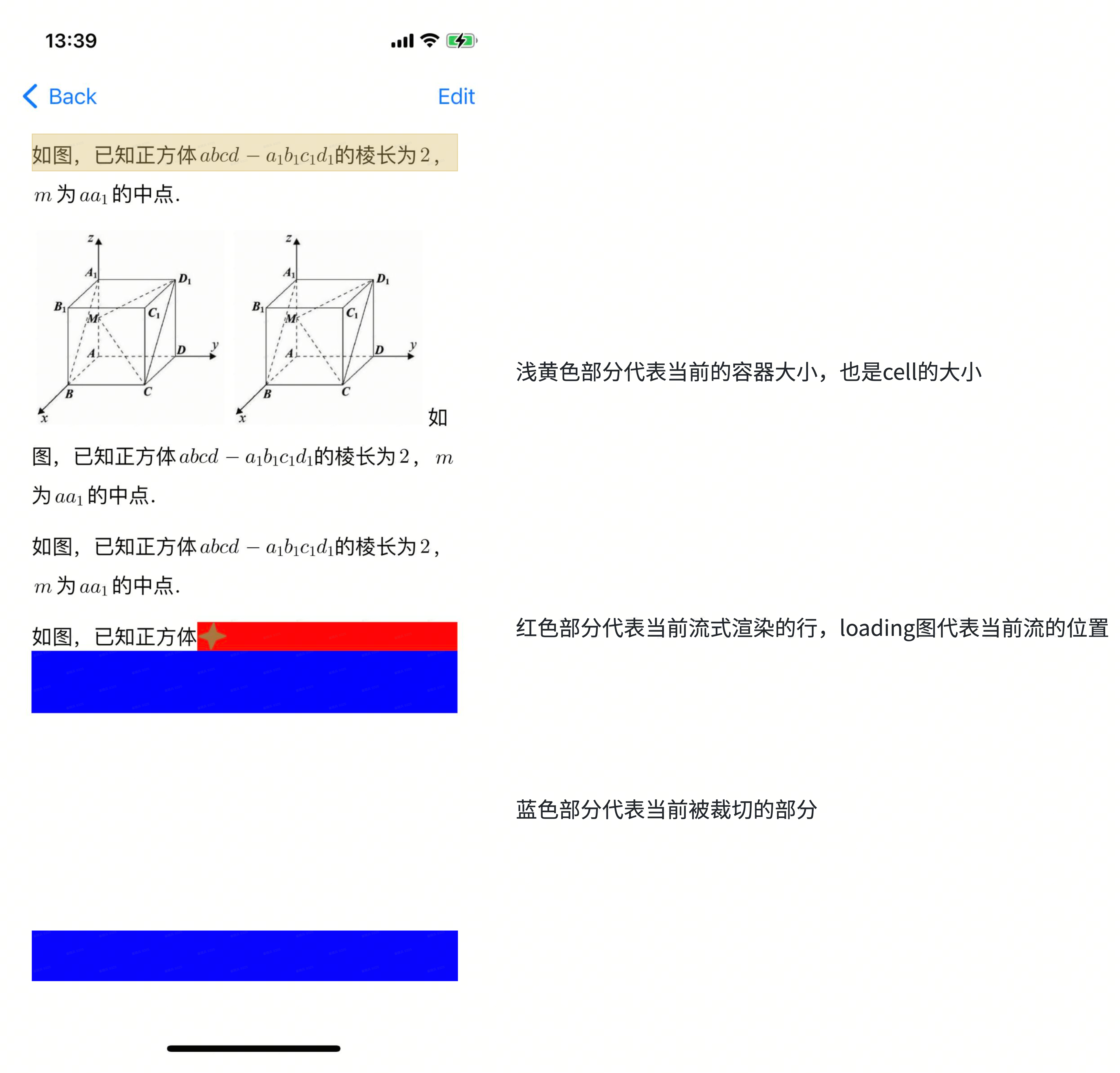
In production interfaces, streaming content often appears inside a scrolling list. A normal cell receives its size from the surrounding layout, but a streaming cell grows as new content is revealed. The renderer must therefore report updated dimensions to the containing cell throughout the stream.
Updating the cell height alone is not enough. The cell also needs a clipping container so that content outside the revealed region remains hidden.
When a streaming card lives in a list, do not call
reloadDataorreloadItemsAtIndexPaths:after changing its model height; recreating the cell causes visible flicker. Ask the list to recompute geometry without reloading its content instead.
1 | // UITableView |
Pitfalls
Raw LaTeX flashes before the formula appears
A chunk boundary may split a formula. If the incomplete prefix is treated as ordinary text, raw LaTeX briefly appears and is then replaced by the rendered formula when the closing delimiter arrives.
The preprocessing pass normally rewrites $xxx$ as
<tex>xxx</tex>. An incomplete prefix such as
$(a-b) does not match that expression, so the HTML parser
emits it as plain text. Once the buffer grows to
$(a-b)^{2}$, the same range becomes a valid formula and
changes representation.
One possible fix is to rewrite an unmatched $xx prefix
as <tex>xx as well. The LaTeX parser can then render
complete prefixes and suppress invalid ones.
That still left several ambiguous intermediate states, so the iOS
implementation uses a conservative rule: an incomplete
<tex> element such as <tex>xx
produces no visible output until </tex> arrives.
During streaming, the formula position simply remains in the
loading state.
Text justification
YYLabel supports justified text through
view.textAlignment = NSTextAlignmentJustified, but
justification can reposition characters that are already visible
whenever the line grows. That movement is acceptable for static text and
distracting during streaming, so streaming cards avoid justified
alignment.
Incorrect mask bounds at line breaks
The masks rely on YYTextLayout for the current
character’s rectangle. Around some line breaks, that rectangle is
incorrect.
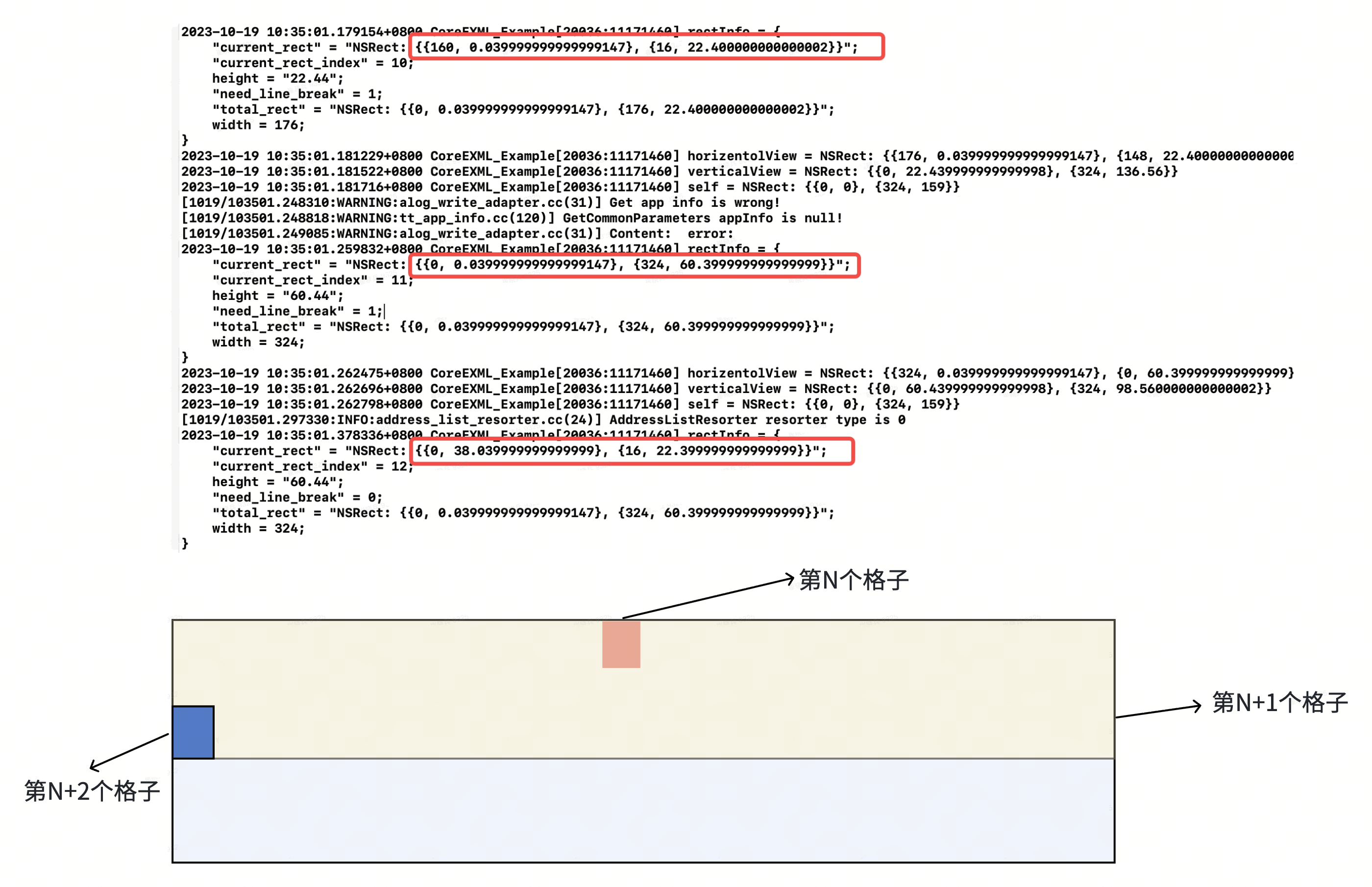
In the figure, revealing cell N completes the line, so
the next cursor position should be cell N+2.
YYTextLayout instead returns the oversized N+1
rectangle. That rectangle overlaps content already revealed and content
that should still be hidden, making text appear and then disappear
behind the mask.
The bug comes from YYTextLayout including zero-width or
zero-height rectangles in a union calculation. Ignoring those empty
rectangles produces the expected cursor geometry.
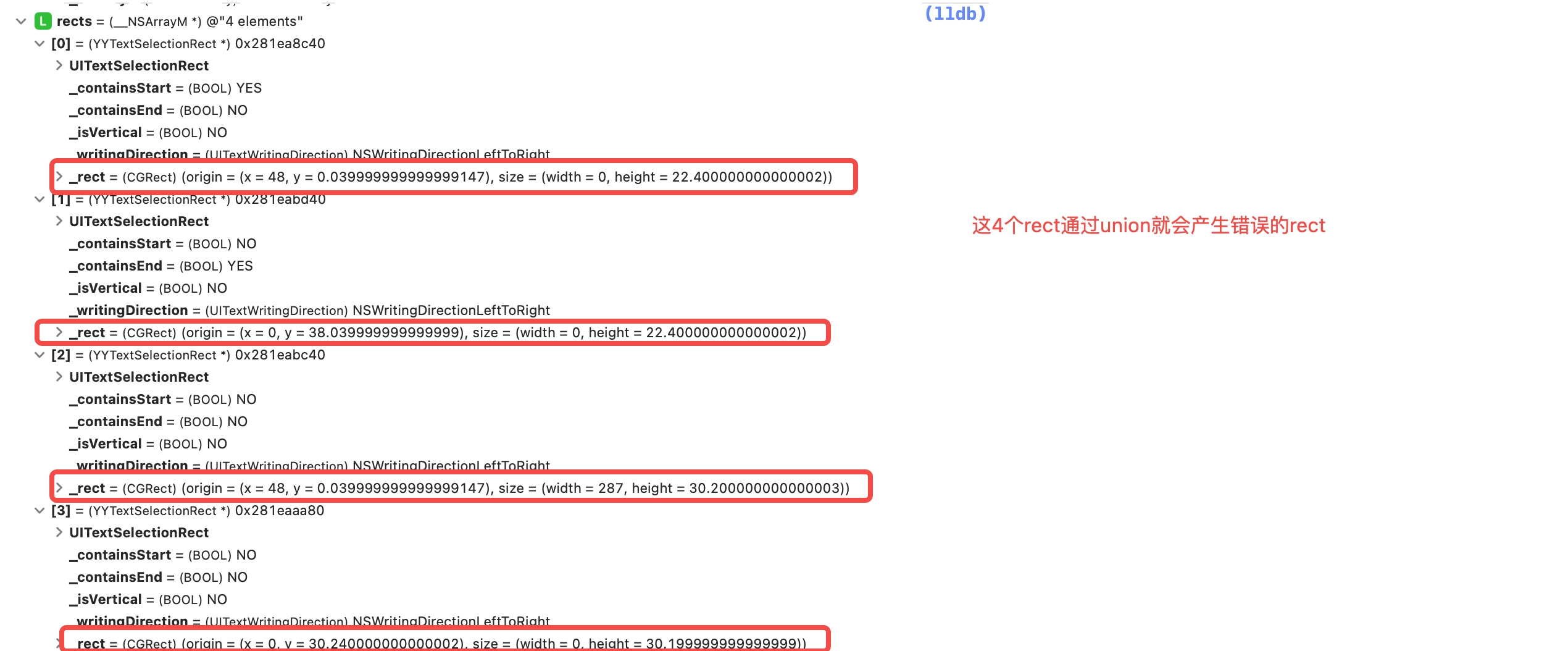
Modify rectForRange: as follows:
1 | - (CGRect)rectForRange:(YYTextRange *)range { |
Underline spacing
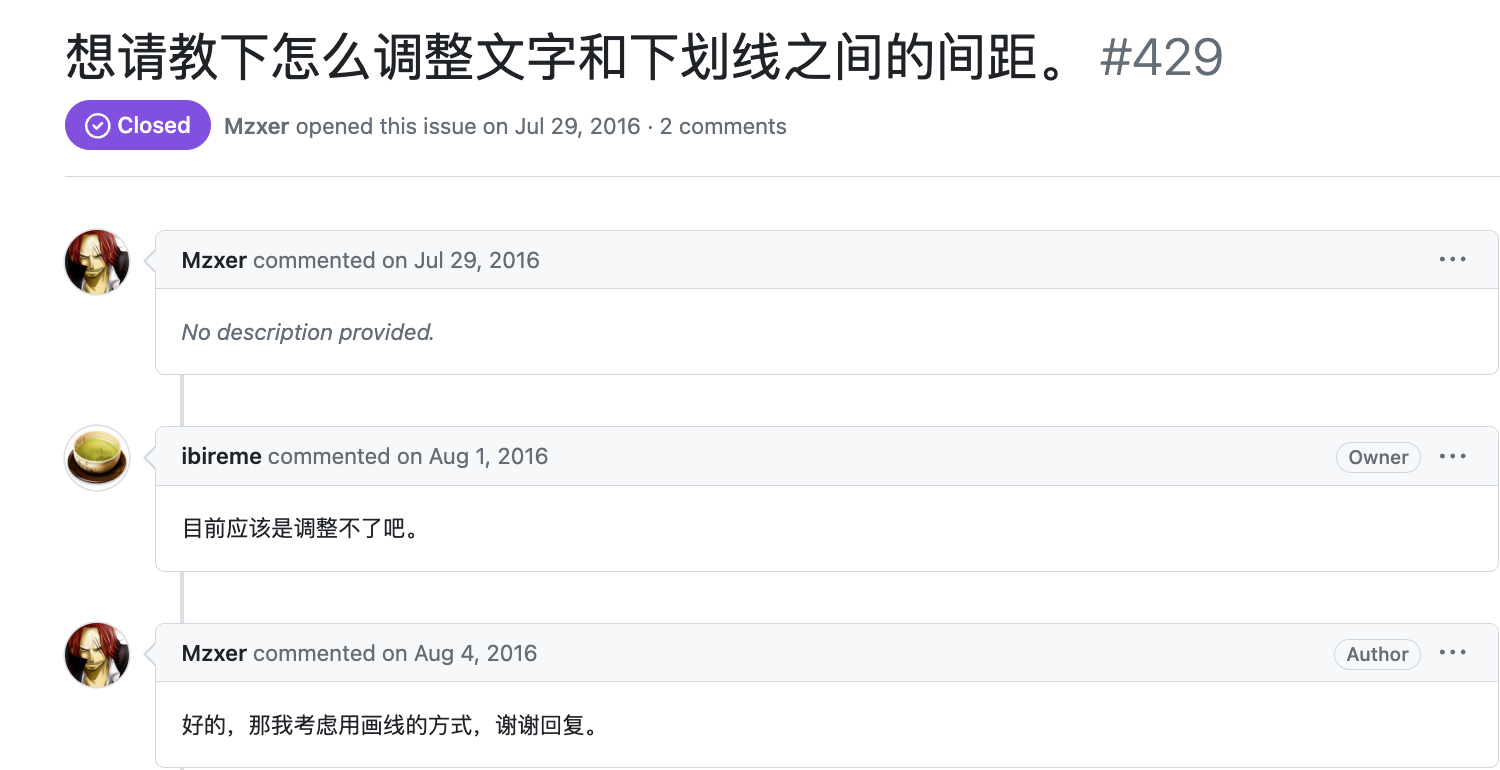
YYText does not expose the distance between text and its
underline, but the product design requires that control. We modified
YYTextDrawDecoration to support an underline offset.
1 | + (instancetype) decorationWithStyle: (YYTextLineStyle)style width: (nullable NSNumber *)width color: (nullable |
YYTextDrawDecoration then adds offset to
the underline’s y coordinate.
1 | static void YYTextDrawDecoration(YYTextLayout *layout, CGContextRef context, CGSize size, CGPoint point, YYTextDecorationType type, BOOL (^cancel)(void)) { |
This change can push the final underline beyond the original layout bounds, where it gets clipped. The layout height must therefore include the additional offset.
1 | + (YYTextLayout *)layoutWithContainer:(YYTextContainer *)container text:(NSAttributedString *)text range:(NSRange)range { |
Underlining text attachments
Formulas and images enter the NSAttributedString as
attachments, often taller than the surrounding text. If the underline
still uses the text baseline, it may cut through the attachment.
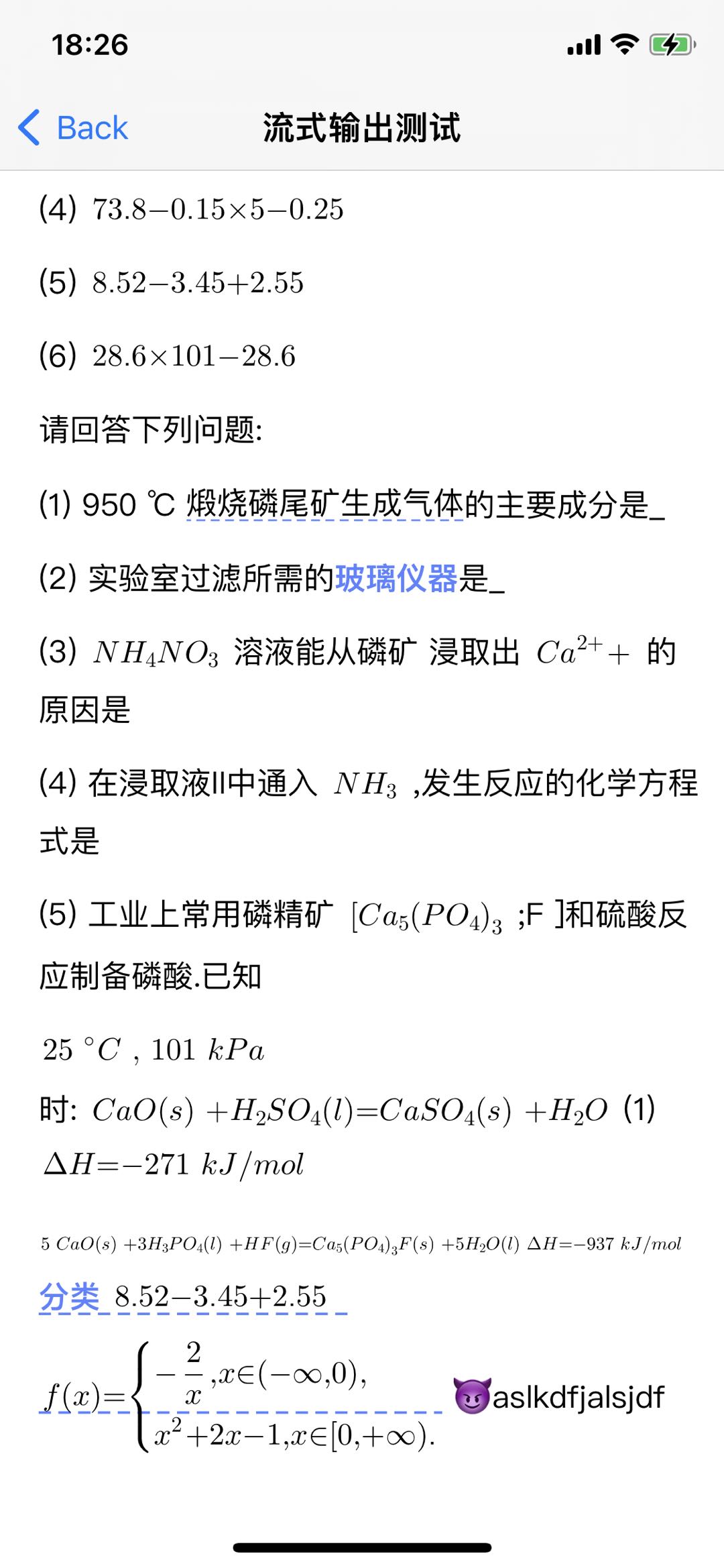
The line layout now inspects each attachment’s ascent
and descent and shifts the decoration using the maximum
descent on that line.
1 | static void YYTextGetRunsMaxMetricOfAttachment(CFArrayRef _Nonnull runs, CGFloat * _Nullable xHeight, CGFloat * _Nonnull underlinePosition, CGFloat * _Nullable lineThickness) { |
1 | static void YYTextDrawDecoration(YYTextLayout *layout, CGContextRef context, CGSize size, CGPoint point, YYTextDecorationType type, BOOL (^cancel)(void)) { |
This fix depends on every attachment reporting accurate
ascentanddescentvalues.
Flicker and cursor drift
Another failure appeared when network chunks arrived faster than the
reveal timer: the view could adopt a new layout while the masks still
referenced the previous one. Repeated YYText refreshes then
caused both cursor drift and flicker.
The fix is to stage new layouts instead of applying them immediately. The renderer finishes revealing its current layout, swaps in the newest pending layout, and continues. If no pending layout exists and the network stream has ended, rendering is complete.
Several network updates may replace the pending layout before the current one finishes. Coalescing them this way reduces view refreshes, keeps mask geometry consistent, and improves performance.
1 | - (void)updateStreamingTextLayout:(YYTextLayout *)textLayout { |
1 | - (void)startRenderingTimer { |
Syncing stream interruption progress to TTS
Our app also converts the rich text into plain speech input for
TTS. Under normal conditions this is straightforward, but
interruption creates a synchronization problem: the visible response may
stop at ... after the full readable text has already
entered the speech queue. The result is audio that continues beyond what
the user can see.
To keep speech and display in sync, the renderer emits TTS input only as each character becomes visible. TTS maintains its own queue, so interrupting the visual stream naturally stops new speech at the same point. The message model also stores that character index, allowing later playback to reconstruct the same truncated response.
Ambiguous adjacent dollar delimiters
This edge case comes from TeX’s two traditional dollar-delimited math modes:
- inline math mode, where formulas appear within a
paragraph and use
$...$. - display math mode, where formulas occupy their own
line and use
$$...$$.
Modern LaTeX documents generally prefer explicit delimiters:
- For inline math mode, use
\(... \)or\begin{math}...\end{math}, instead of$...$. - For display math mode, use
\[... \]or\begin{displaymath}...\end{displaymath}, instead of$$...$$.
In this content format, LaTeX formulas are embedded inside HTML, so
HTML parsing happens first. A custom
<tex>...</tex> element marks formula ranges for
the LaTeX renderer.
Formula text may itself contain characters that are meaningful to
HTML. In <tex>1\+2<5</tex>, for example,
< is a mathematical operator, but an HTML parser may
interpret it as the start of a tag. The preprocessing pass therefore
escapes <, >, &,
", and ' inside every <tex>
range before HTML parsing begins.
LLM output may use any of these delimiter styles, so the client
accepts all of them. The first implementation handled dollar delimiters
with two regular expressions: match $$...$$ first, then
$...$, and rewrite each match as
<tex>...</tex>.
That approach assumes a literal dollar sign is escaped as
\$; an unescaped $ can otherwise shift every
later match.
1 | - (void)preprocess { |
The pattern $...$$...$ breaks this strategy. It
represents two adjacent inline formulas, but the middle $$
also resembles a display-math delimiter. The display regex finds no
complete pair; the inline regex then consumes the outer dollar signs and
incorrectly sends ...$$... to the LaTeX parser as one
formula.
We replaced the regular expressions with a single stateful scan:
- If the current
$closes an open$range, close that inline formula. - Otherwise, inspect the next character.
- If it is also
$, treat the pair as a$$delimiter and either open or close display math. - If not, open a new inline formula with
$.
- If it is also
1 | - (void)preprocess { |
The same scanner handles $...$, $$...$$,
\(...\), and \[...\], while escaping
HTML-sensitive characters inside formula ranges. Keeping those decisions
in one pass avoids the overlapping matches that made the
regular-expression version fragile.
It is also faster: in our measurements, preprocessing took only 25–50% as long as the regular-expression implementation.
Summary
Building on YYText made it possible to ship
pseudo-streaming without replacing the existing text stack. It also
exposed several architectural limits:
- Several fixes require maintaining a fork of
YYText, which increases the cost of upgrades and long-term maintenance. - The host app has limited control over block elements such as tables
and lists.
YYTextis primarily a text layout engine; once content mixes nested blocks, images, and tables, its attachment model makes precise layout control difficult. - HTML and LaTeX converge too late in the pipeline. A formula enters
YYTextas one attachment view, so it cannot be revealed incrementally like ordinary text.
A longer-term solution would use one rendering engine for several rich-text syntaxes. Markdown, HTML, and LaTeX need different parsers, but they can still share a layout and rendering model. That would make nested blocks and incremental formula rendering easier to support without patching each syntax independently.
The remaining design questions are:
- Is it possible to build a truly streaming parser?
- Can the number of layout passes be reduced?
- Can layout and painting become genuinely incremental rather than merely appear incremental?

