Background
As ChatGPT-style products became common, many apps started integrating AI responses into chat interfaces. Those responses are usually returned as Markdown, so mobile clients need reliable Markdown rendering support. A quick survey showed three practical constraints:
- Many existing solutions are based on
WebView, which can be expensive on mobile. - On
iOS,CocoaMarkdownis one of the few native rendering libraries, but its feature coverage and extensibility are limited. - On
Android,Markwonhas a solid architecture, but it is Android-only.
That led to a native cross-platform renderer with a shared C++ core
and thin platform adapters for iOS and Android. In this article,
uppercase Markdown refers to the SDK, while lowercase
markdown refers to the syntax.
Library overview
Markdown is an embeddable native rendering library for
iOS and Android. It supports standard Markdown syntax together with a
selected set of HTML elements. The current implementation targets those
two platforms, with no additional adapters planned for now.
Supported syntax
Basic syntax
https://www.markdownguide.org/basic-syntax/Extended syntax
https://www.markdownguide.org/extended-syntax/
Rendering result
iOS is shown on the left and Android on the right.
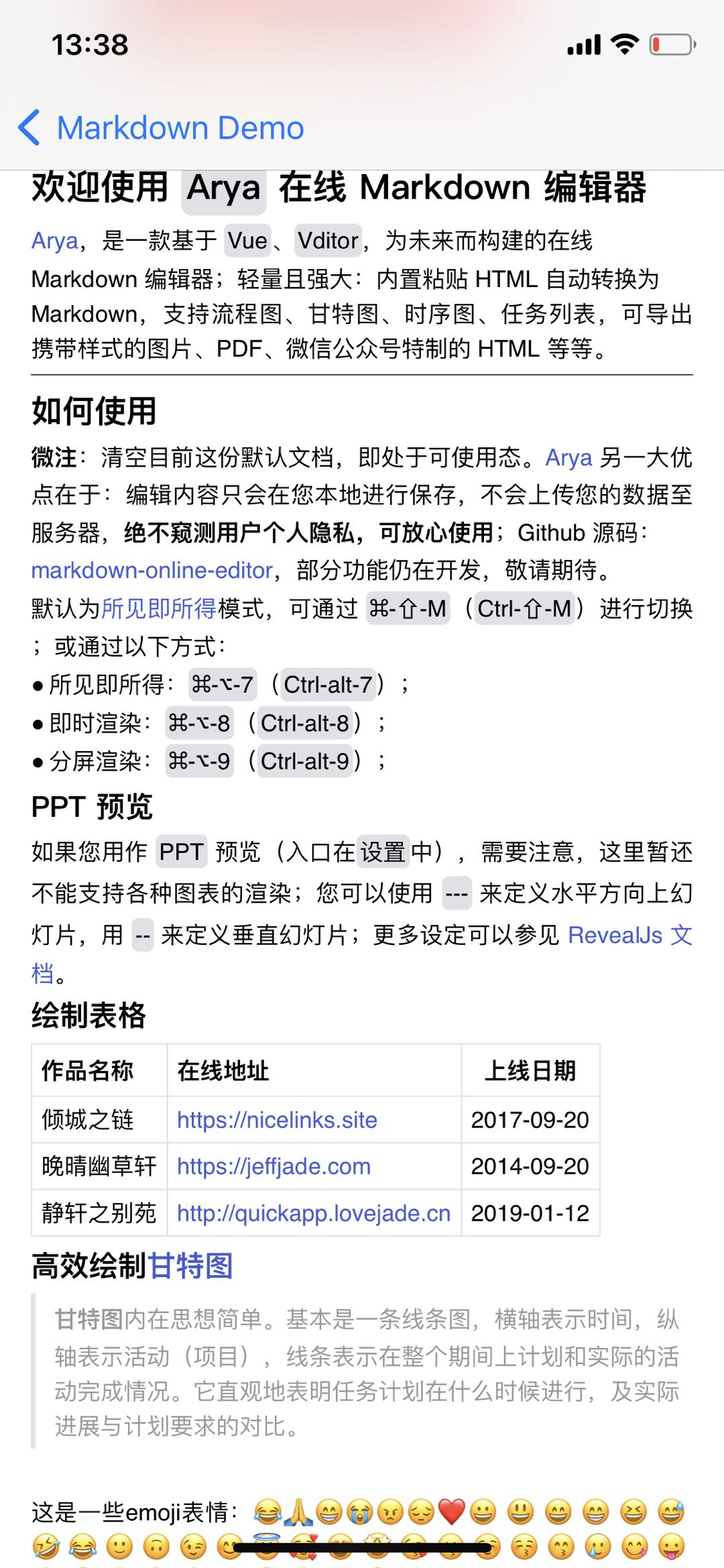
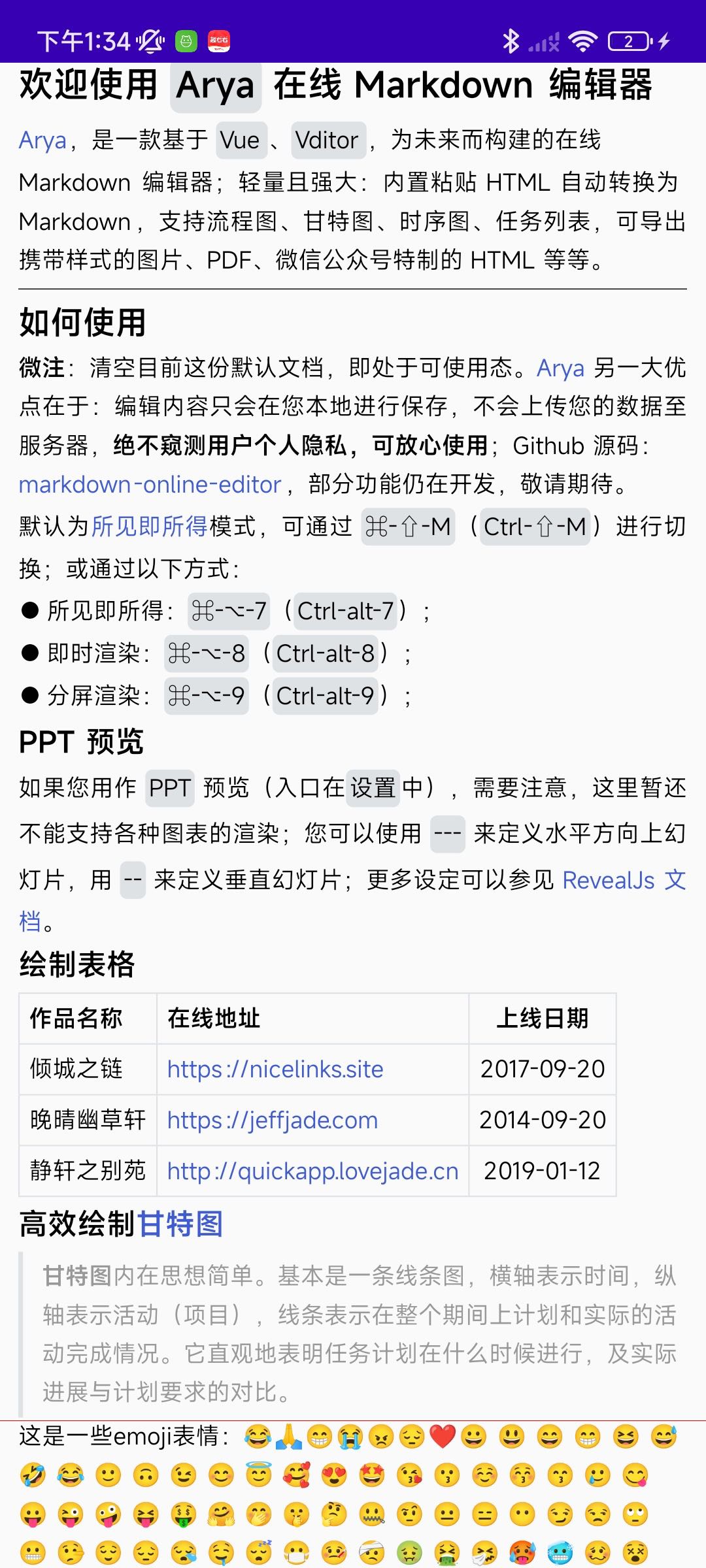
Here are the demo videos:
How to use it
iOS
- Register
ImageDownloader
Some images referenced by markdown need to be
downloaded, but networking does not belong in the shared
C++ rendering core. The SDK therefore exposes an
ImageDownloaderDelegate interface. The host app implements
that interface with its preferred networking and caching stack, then
injects the downloader through the public API.
1 | // an example of image downloader |
- Set up the parameters
1 | MarkdownParam *param = [[MarkdownParam alloc] init]; |
- Build the icon
We strongly recommend doing this step on an asynchronous thread.
1 | MarkdownIcon *icon = [MarkdownEngine buildIconWithParam:param]; |
- Create
MarkdownViewand bind the icon to it
1 | MarkdownView *view = [[MarkdownView alloc] initWithParam:param icon:icon]; |
Android
- Initialize the library
1 | MarkdownInitializer.init(Application.getInstance()) |
- Register
imageLoader
1 | // an example of IImageLoader |
- Set up the parameters
1 | val content = "[Markdown syntax](https://markdown.com.cn)" |
- Build the icon
1 | val iconBuilder = MarkdownIconBuilder(param) |
- Bind the icon to
MarkdownView
1 | val view = findViewById(R.id.markdownView) |
Implementation
Cross-platform foundation
Rendering eventually touches platform UI APIs, while the reusable parts of the problem, parsing and layout, are a better fit for portable C++. The design works by placing abstract drawing interfaces between those two worlds.
The C++ core lays out and paints content against abstract canvases, brushes, fonts, and views. Each platform adapter binds those interfaces to its native graphics stack only when measurement or drawing is required.
The advantages are:
- Both platforms can produce almost identical rendering results.
- Both platforms only need to develop and maintain one copy of the core logic.
- The portable core leaves room for additional platform adapters.
Of course, it also has drawbacks:
- The implementation requires solid
C/C++experience, and the learning curve is steeper than it is for most platform-native UI frameworks. - The abstraction boundary hides some conveniences that native UI frameworks normally provide out of the box.
Architecture
The engine is divided into a platform-independent core and a thin platform layer:
The blue area is the C++ core, responsible for parsing Markdown and producing layout and drawing operations.
- The third-party library
md4cperforms the actual markdown parsing. NodeTree,AtomTree, andBoxTreeform the engine’s three-stage representation.Graphics2Dand its supporting interfaces provide the platform-neutral drawing surface.BoxBreakercontains the line-breaking and layout rules.
- The third-party library
The orange area contains the iOS and Android adapters.
- The iOS adapter is implemented in Objective-C++.
- The Android adapter uses Kotlin and JNI.
A future Flutter adapter could call the C++ core directly through Dart FFI rather than routing rendering through iOS or Android platform channels.
Sequence diagram
The following sequence diagram uses Android as the example.
Building the Node tree
Why md4c?
There is no reason to write another Markdown parser from scratch. I
chose md4c for
four practical reasons:
- It conforms to
CommonMark 0.30. - It parses quickly.
- It is simple to use.
- It is portable.
Qt also uses md4c for Markdown parsing.
How to use md4c
md4c uses a push parser: it walks the document and invokes application callbacks when blocks or spans begin and end, and whenever it encounters text. The engine registers five callbacks for those events:
1 | class MDParser { |
The usage is straightforward: set parser flags and callbacks, then start parsing.
1 | // MDParser.cpp |
Markdown node definition
1 | // MDBaseNode.h |
The SDK currently defines the following syntax-tree node types:
How to build the node tree
1 | class MDParser { |
A stack turns md4c’s callback stream into a tree:
enterBlockorenterSpanstarts a node and pushes it onto the stack.- The first node becomes
mRootNodeand never changes. mCurrentNodepoints to the stack top. A newly parsed node is attached to it, then becomes the new current node.
- The first node becomes
Using an unordered list as an example:
1 | int MDParser::enterBlock(MD_BLOCKTYPE type, void* detail, void* userdata) { |
1 | void MDParser::pushNode(const std::shared_ptr<MDBaseNode> &node) { |
leaveBlockorleaveSpancompletes the current node. The parser pops it, restoresmCurrentNodeto its parent, and verifies that the closing callback matches the node being removed.
1 | int MDParser::leaveBlock(MD_BLOCKTYPE type, void* detail, void* userdata) |
1 | void MDParser::popNode(const std::string& name) { |
foundTextcreates a leaf node and attaches it directly to the node at the top of the stack.
1 | int MDParser::foundText(MD_TEXTTYPE type, const MD_CHAR* text, MD_SIZE size, void* userdata) { |
1 | void MDParser::addChildNode(const std::shared_ptr<MDBaseNode>& node) { |
When md4c finishes, mRootNode owns the complete syntax
tree.
How to handle HTML tags
Markdown may also contain inline HTML:
- md4c reports each HTML fragment as text rather than exposing its
structure. A second parser must distinguish opening, closing, and
self-closing elements such as
<img/>and<br>and update the node stack accordingly. - That parser must also extract element attributes.
1 | // MDParser.cpp |
1 | // MDParser.cpp |
HtmlTagParser handles that second parsing pass.
1 | // HtmlTagParser.cpp |
The SDK currently supports these HTML elements:
Most HTML elements reuse existing Markdown nodes; superscript and subscript require dedicated node types.
1 | // HtmlTagNodeAlias.h |
How to handle HTML entities
HTML entities may also appear in Markdown input. The parser decodes
them before layout and stores the resulting Unicode text in
MDTextNode objects.
1 | ₹ '−α⇒β∴–’γ&√≠ב"²±…≤≥÷λ°—½&OQ&Hintsº³­π∠Δ⊥“”·∼→θ′„∑≈≅ ⋅♠♥♦♣φ∈∀∉″∗∨∧∪δ∩¼⊂μ∫æö¶±±£»®§¯¹²³ßþ×úûù¨üý¥ÿ |
1 | // MDParser.cpp |
Entity parsing has a few edge cases. The following code shows the core approach:
1 | // MDParser.cpp |
After parsing, the display result looks like this:
1 | ₹ '−α⇒β∴–’γ&√≠ב"²±…≤≥÷λ°—½&OQ&Hintsº³π∠Δ⊥“”·∼→θ′„∑≈≅ ⋅♠♥♦♣φ∈∀∉″∗∨∧∪δ∩¼⊂μ∫æö¶±±£»®§¯¹²³ßþ×úûù¨üý¥ÿ |
Example
The following fixture intentionally keeps Chinese text. It is not untranslated body copy; it is test data for CJK typography, inline HTML, emoji, entities, and the node/atom/box trees generated from non-Latin text:
1 | 测试列表 |
For this markdown text, the generated node tree looks like this:
1 | MDDocNode |
Building the Atom tree
After recursive descent produces the syntax tree, the engine converts
it into an Atom tree. Most Node types map to
an Atom, although the relationship is not strictly
one-to-one.
Atom assembly rules
Atoms preserve the hierarchy of the syntax tree. A node usually
produces either one Atom or a RowAtom
containing several children, and those children may themselves contain
nested atoms.
Each Node has a virtual getAtom method. The
base implementation in MDBaseNode looks like this:
1 | // MDBaseNode.cpp |
Pure container nodes such as MDDocNode and
MDParagraphNode can inherit the default implementation.
Nodes with formatting or structural semantics override
getAtom.
For example, MDBoldNode::getAtom wraps each child atom
in a BoldAtom, then combines the results in a
RowAtom.
1 | // MDBoldNode.cpp |
Some nodes have more complex rules. For example,
MDTableNode::getAtom extracts its children and
grandchildren and reassembles them into an MDTableAtom.
1 | // MDTableNode.cpp |
Example
Continuing with the node tree above, the generated Atom
tree looks like this:
1 | RowAtom |
Building the Box tree
Each Atom produces one or more layout boxes through the
base class’s virtual createBox method:
1 | // Atom.h |
A Box is a measurable drawing unit with four key
properties:
1 | class Box : public std::enable_shared_from_this<Box> { |
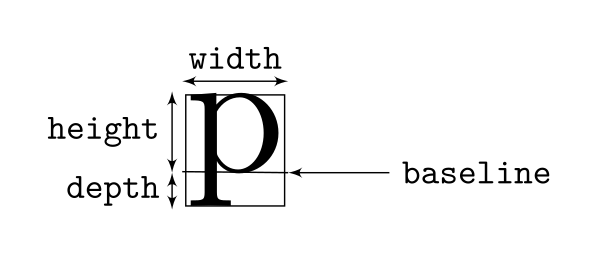
Because the previous step produced an n-ary tree of
Atoms, createBox also works recursively: each
child generates its own Box, and the current node combines
those boxes according to its layout rules. The boxes are aligned around
their baseline values and eventually form an n-ary tree
that mirrors the Atom tree.
Example
Continuing with the previous Atom tree, the generated
Box tree looks like this:
1 | HorizontalBox |
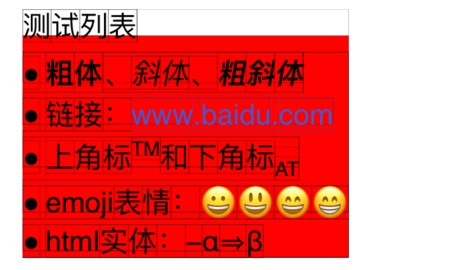
The debug grid in the rendered output makes the final
Box boundaries visible.
Layout
The previous stages produce an n-ary Box tree in the C++
core. Before those boxes can be painted onto the abstract canvas, the
layout engine must assign each one a final position.
Streaming Box splitting
Markdown content follows a flow layout, but every line has a finite
width. The first layout problem is therefore deciding where the
Box tree can be split to wrap onto the next line.

Assume the figure is the Box tree:
- The white node is
root. - The light-blue node is the first child.
- The orange-red node is the second child, and it has three child nodes: yellow, sky blue, and purple.
- The blue node is the third child.
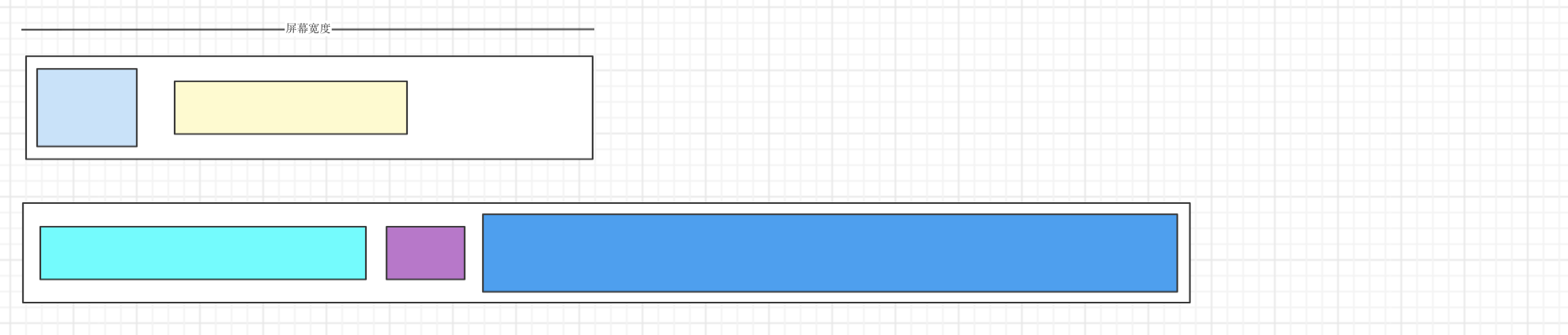
Suppose the first line ends inside the orange-red subtree. Because that node has children, the algorithm descends into it: the yellow child fits, the purple child does not, and the leaf-level sky-blue node must report whether it can be split internally.
- If it cannot be split, the result may look like this:
- If it can be split, the layout may look like this:
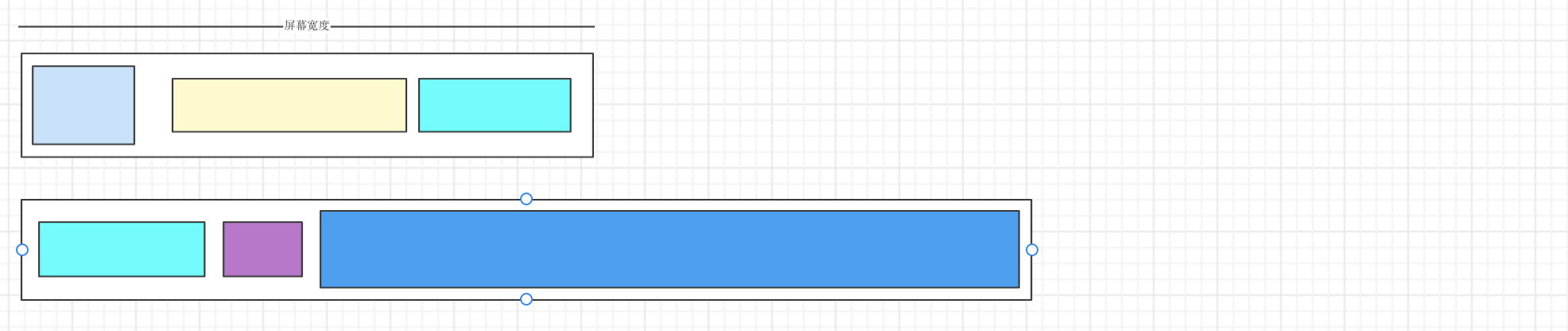
The orange-red node disappears from the split result because it is only a container; its children define all of its geometry. If the sky-blue node also has children, the algorithm descends again and continues until it reaches a valid break point or fills the line.
Pre-layout inside block elements
Block elements such as tables, lists, and quotes occupy a full line in the outer flow, but their contents may still wrap internally. They therefore perform an internal layout pass before they enter the outer line-breaking algorithm.
- Quote
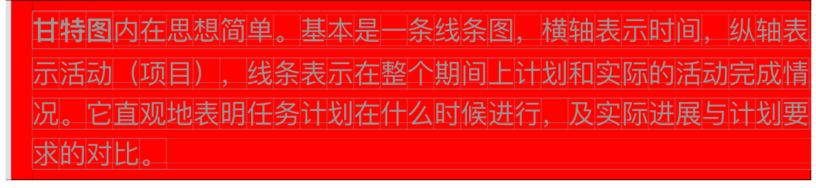
In the quote example, the gray rule and the gap beside it consume part of the available width. The quote lays out its text against the remaining width, then sizes the rule to the resulting text height.
1 | std::shared_ptr<Box> MDQuoteAtom::createBox(const std::shared_ptr<Environment>& env) { |
1 | MDQuoteBox::MDQuoteBox(const std::vector<std::shared_ptr<Box>>& boxes) : boxes(boxes) { |
- Table
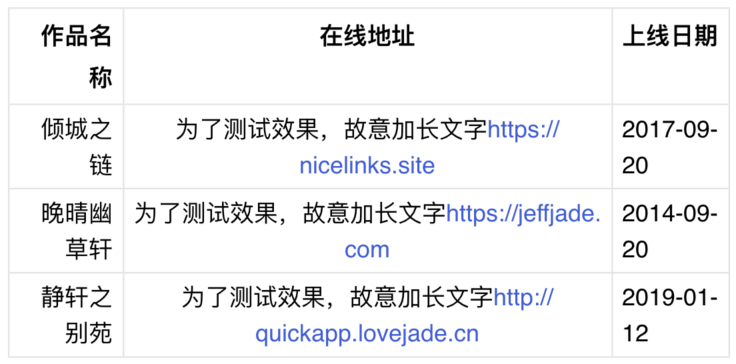
Table layout is more complex:
Determine the natural width of each column and compare their sum with the available table width:
- Calculate the maximum width of each column.
- Sum all column widths.
- If the columns already fit, keep their natural widths.
- Otherwise, shrink them proportionally to fit the available width.
- Reflow each cell against its final column width.
Apply the left, center, or right alignment parsed from the Markdown table definition.
1 | std::shared_ptr<Box> MDTableAtom::createBox(const std::shared_ptr<Environment>& env) { |
Inline alignment
Inline content supports left, right, center, and justified alignment:
- For left alignment, calculate the right-side blank space and fill it
with a
StrutBox. - For right alignment, calculate the left-side blank space and fill it
with a
StrutBox. - For center alignment, calculate blank space on both sides and fill
it with
StrutBoxes. - For justified alignment, distribute the remaining width between neighboring boxes.
1 | double rest = w - b->getWidth(); |
Layout rules: details matter
Text layout also needs language-aware break rules. Here those rules
operate on a nested Box tree rather than a flat character
stream, so the engine must preserve semantic groups while searching for
break points.
- Chinese characters are all potential line-break points.
- Punctuation that must avoid line start or line end is not a line-break point.
- Consecutive em dashes are not line-break points.
- Spaces are line-break points.
- English words are not line-break points.
- Some English punctuation marks are not line-break points.
Keeping punctuation groups together
The following sequences are treated as indivisible units during line breaking:
- Em dashes:
–– - Ellipses:
…...and······ - Straight double quotes:
"xxx", wherexxxis one English word. - Abbreviations such as
I'mandYou're.
MDTextNode groups these sequences before layout so the
line breaker sees each one as a single unit.
1 | std::shared_ptr<Atom> MDTextNode::getAtom() { |
Line-start and line-end punctuation rules
To keep reading smooth and consistent, most punctuation marks have positional restrictions. Depending on their type, a punctuation mark may be forbidden at the start or end of a line:
- Pause marks, commas, periods, colons, semicolons, exclamation marks, question marks, closing quotes, closing brackets, closing book-title marks, hyphens, middle dots, and separators should not appear at the beginning of a line.
- Opening quotes, opening brackets, and opening book-title marks should not appear at the end of a line.
Which punctuation marks need these rules?
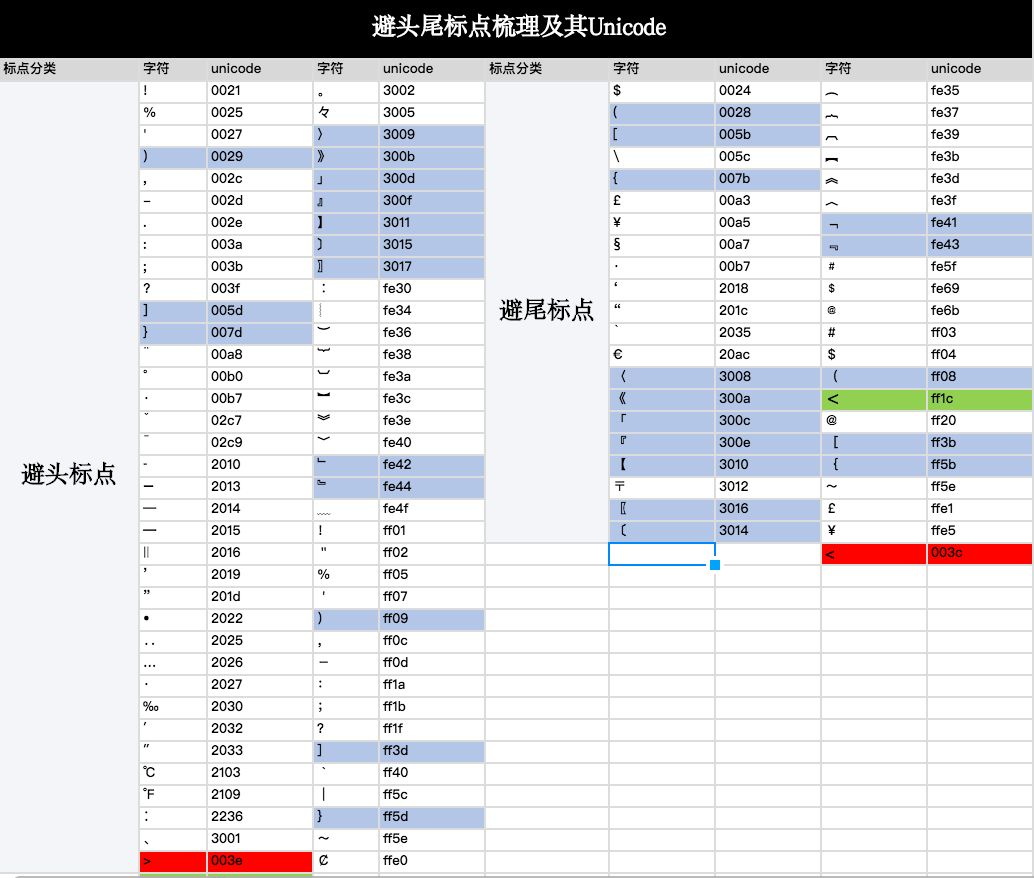
Figure source: https://www.zcool.com.cn/article/ZMTE5NjYwOA==.html#kuak
Push-out vs prefer-push-in punctuation handling
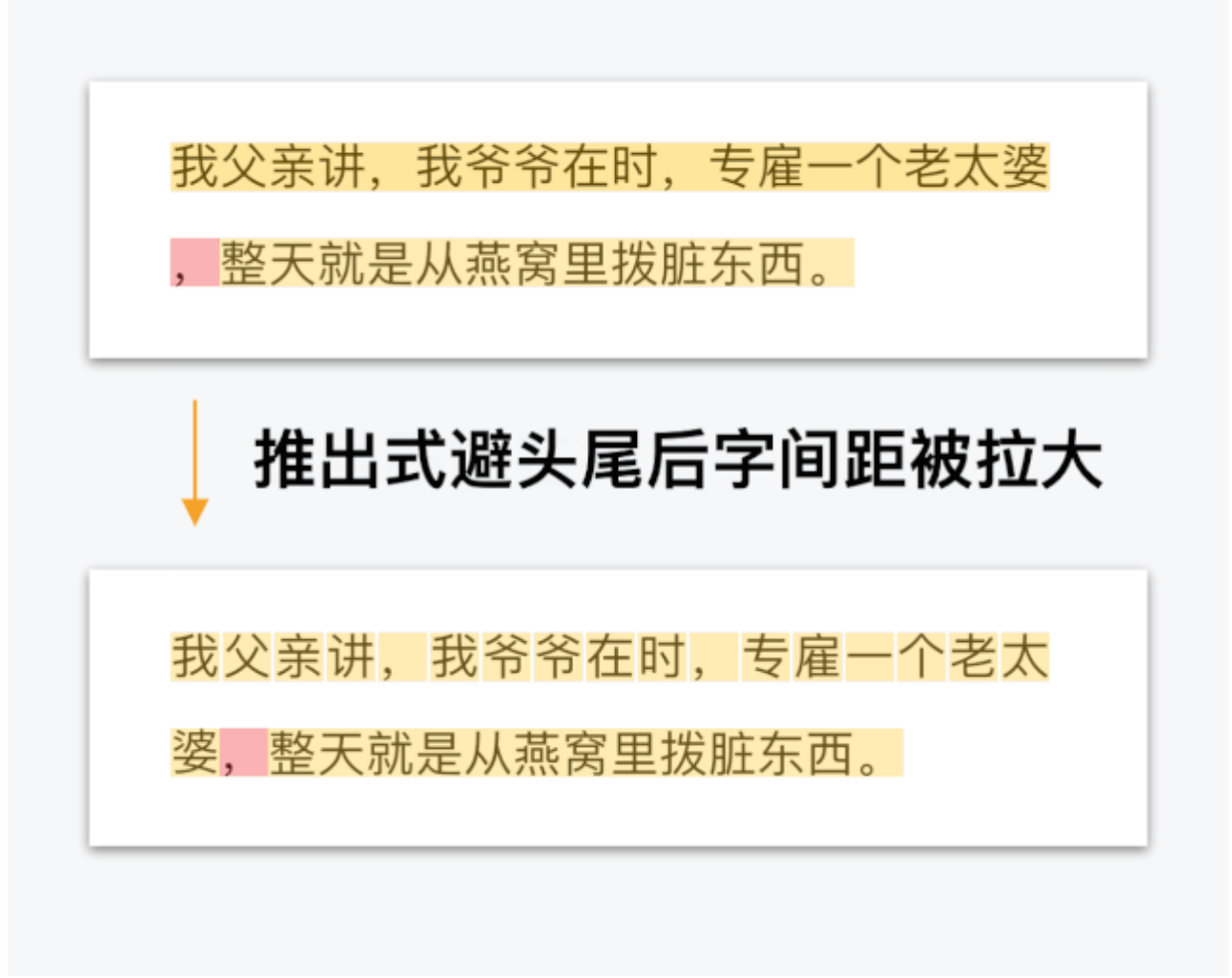
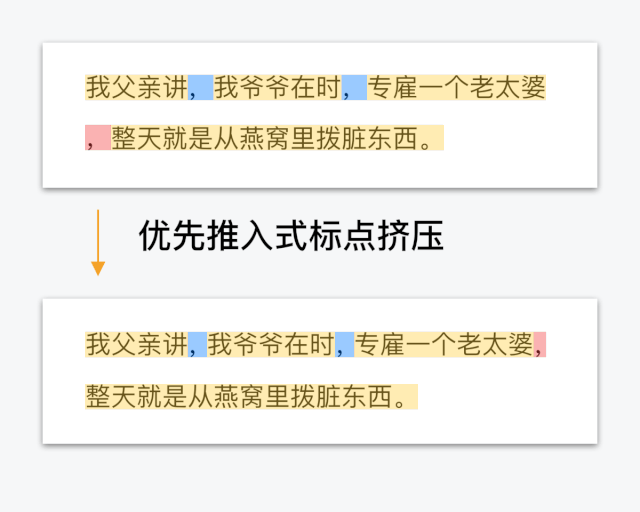
Both figures are from: https://www.zcool.com.cn/article/ZMTE5NjYwOA==.html#kuak
- “Push-out” handling is what most layout systems do. For punctuation that cannot appear at the start of a line, if it is placed at line start, the system pulls one character from the previous line into the current line. This enlarges character spacing on the previous line and interrupts the reading rhythm, as shown on the left.
- “Prefer-push-in” handling compresses the punctuation width inside the current line to make room for the comma that otherwise would not fit. This keeps character spacing stable. Only when the punctuation on the current line cannot be compressed enough does it fall back to push-out behavior, as shown on the right.
Leading-space handling
Sometimes whitespace appears at the beginning of a line. In that case, leading whitespace should be removed.
1 | // LayoutRuler.cpp |
Punctuation width adjustment
Consecutive punctuation
Regardless of the overall text style, when annotation punctuation is adjacent to other punctuation, or when annotation punctuation repeats, spacing should be adjusted to make text more compact and readable. In principle, if two adjacent punctuation marks occupy two character widths, they should be reduced to 1.5 character widths. On that basis, a style may further compress them to one character width. The compression direction should make opening and closing annotation marks stay close to the content they annotate.
The detailed compression rules are:
- If a closing annotation mark is followed by an opening annotation mark, another closing annotation mark, a pause mark, comma, period, colon, or semicolon, squeeze it.
- If an opening annotation mark is followed by another opening annotation mark, squeeze it.
- If a pause mark, comma, or period is followed by an opening or closing annotation mark, squeeze it.
- If a semicolon or colon is followed by an opening annotation mark, squeeze it.
1 | void LayoutRuler::applySqueezeRulesOfAdjacentPunctuation(const std::shared_ptr<HorizontalBox>& root) { |
Line-start and line-end punctuation compression
When punctuation appears at the start or end of a line, the following spacing rules make the text more compact and readable:
- If an opening annotation mark appears at the start of a line, half a Han-character width can be removed from its leading side.
- If punctuation that originally occupies one character width appears at the end of a line, half a Han-character width can be removed from its trailing side.
RTL support
Right-to-left languages such as Arabic and Hebrew reverse the
direction of both reading and many UI layouts. Since iOS 9, UIKit has
supported this through semantic content attributes and direction-aware
leading and trailing anchors.
Mirroring an entire window is not sufficient because text glyphs
themselves must remain readable. UIKit therefore treats controls such as
UILabel and UITextView as non-flippable and
applies bidirectional text rules inside them.
The custom renderer must provide the equivalent behavior itself:
- Resolve bidirectional text within each paragraph instead of mirroring glyphs.
- Mirror the structure and alignment of block elements such as quotes, tables, and lists.
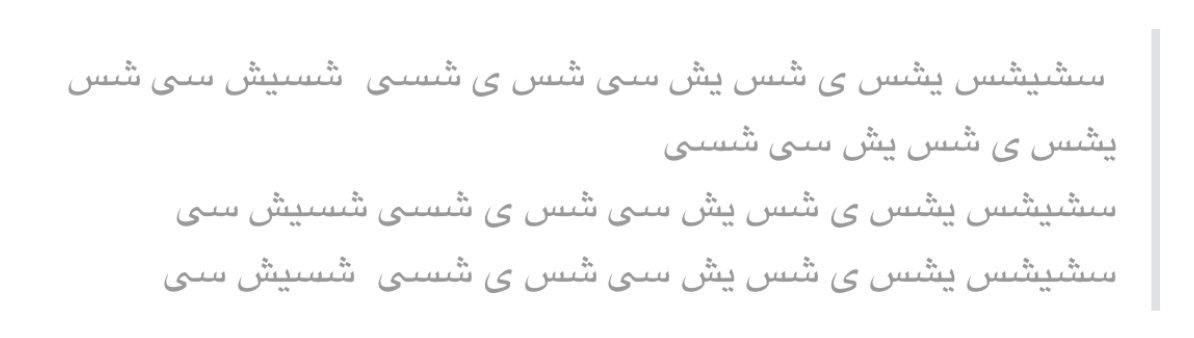
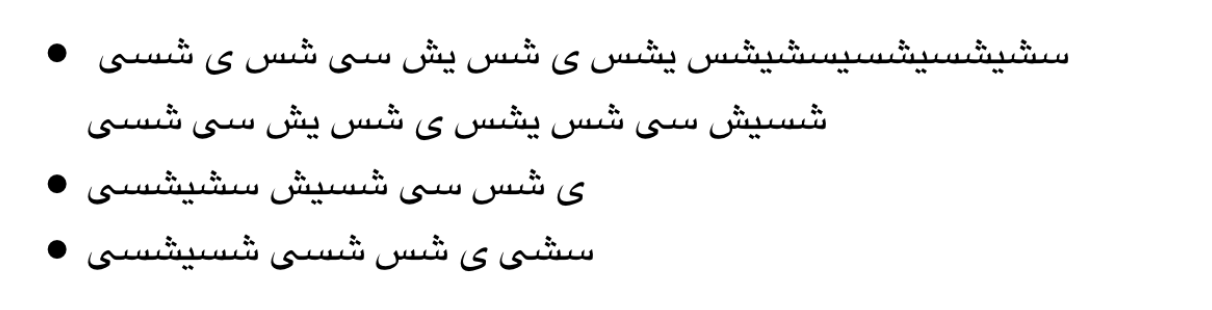
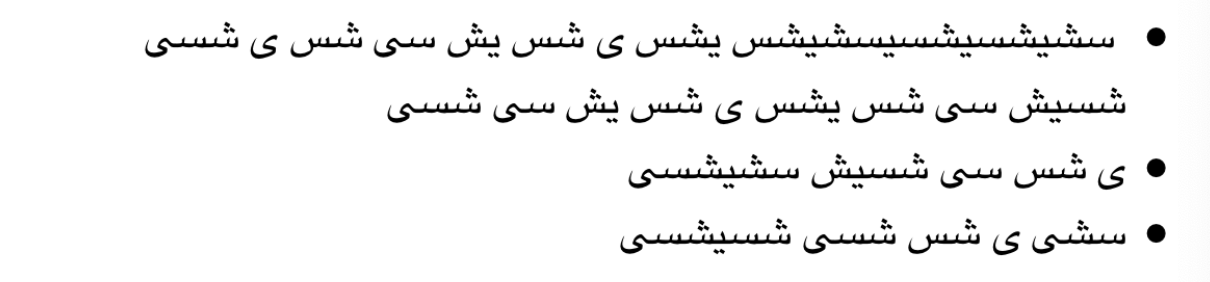
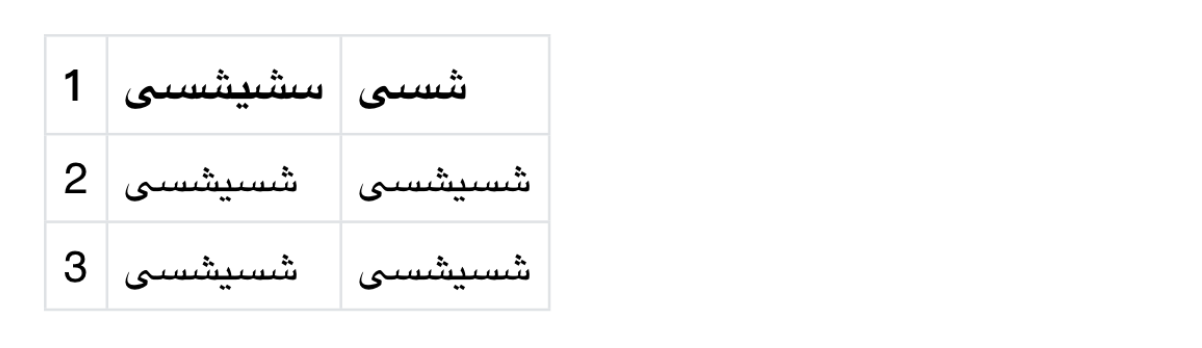
In the diagrams, the left side shows the Markdown engine without processing, while the right side shows the correct display after processing.
Usage
1 | MarkdownParam *param = [[MarkdownParam alloc] init]; |
Text
For each paragraph, the engine uses the first character to determine
the layout direction. For example, "مرحبا 你好" starts with
Arabic, so RTL rules are used. Similarly, "你好 مرحبا"
starts with Chinese, so LTR rules are used.
- If LTR rules are used, scan each line for RTL ranges and reverse the RTL text inside those ranges.
- If RTL rules are used:
- Scan each line for RTL ranges and reverse the RTL text inside them.
- Scan each line for LTR ranges, and move trailing punctuation and spaces in each LTR range to the beginning of that range.
- Use the scanned ranges as units and perform cyclic shifting.
Quote
- The gray vertical line should be laid out on the right.
- The text inside should be right-aligned as a whole.
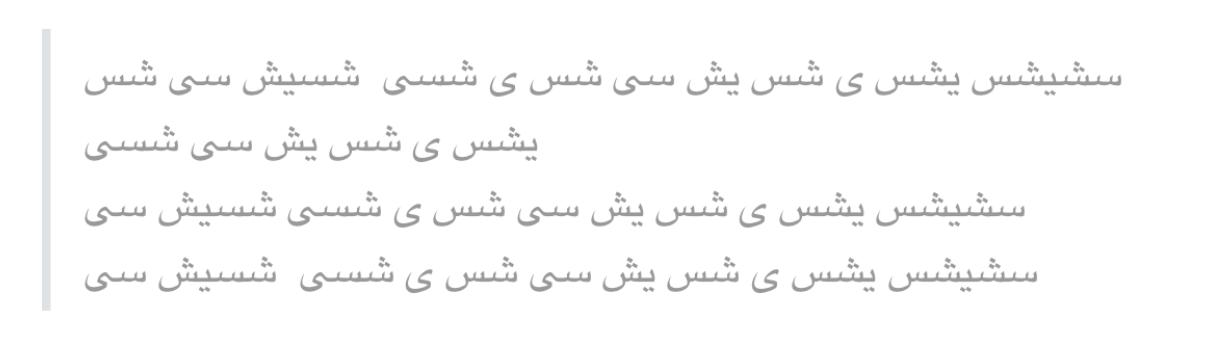
List
For lists:
- The bullet should be laid out on the right.
- The text should be right-aligned as a whole.
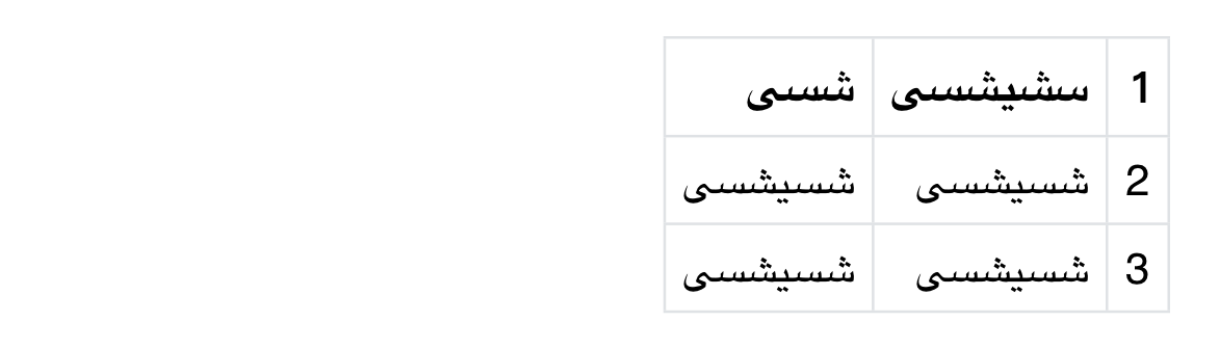
Table
For tables:
- RTL tables should first be aligned to the right as a whole.
- Table columns should also be ordered from right to left. For example, the first numeric column in LTR becomes the third column in RTL.
- Alignment rules must also be adapted. Left alignment in LTR becomes right alignment in RTL.
Event interaction
Tap events
Links and other interactive elements need hit testing even though most rendered content has no native control behind it. The engine handles this by storing event metadata on boxes and searching the tree recursively for the box at a touch coordinate.
hitTest
Define hitTest on the base Box class:
1 | // Box.h |
Subclasses can override hitTest:
1 | // HorizontalBox.cpp |
Binding event information
Interactive nodes carry an AreaInfo object containing
the event type and payload. MDHrefNode, for example,
attaches that metadata to its atoms, which propagate it to the generated
boxes.
1 | std::shared_ptr<Atom> MDHrefNode::getAtom() { |
1 | void FontRenderingAtom::addTexBox(SplitStyle splitStyle, std::shared_ptr<HorizontalBox>& hb, const std::wstring &str, int style, double factor, const std::shared_ptr<Font>& font, bool kerning) { |
Finding event information by coordinate
When a touch arrives, Icon finds the smallest
indivisible box containing that point. If the box carries
AreaInfo, the renderer forwards the event payload to its
delegate.
1 | std::shared_ptr<AreaInfo> Icon::getAreaInfo(const std::shared_ptr<Point2D>& point) { |
1 | - (void)touchesBegan:(NSSet<UITouch *> *)touches withEvent:(UIEvent *)event { |
Region selection
A native rich-text view also needs text selection. Because this
renderer owns its layout tree, it cannot delegate selection to
UILabel or UITextView; it must map the user’s
gesture back to boxes and draw the selected range itself.
Long press to determine start and end points
A long press starts selection. As the gesture changes, the view tracks the anchor and extent; when the gesture ends, those points define the initial selected range.
1 | - (void)handleLongPress:(UILongPressGestureRecognizer *)gestureRecognizer { |
Modifying start and end points
Afterward, the user can drag either handle to adjust the range.
1 | - (void)touchesBegan:(NSSet<UITouch *> *)touches withEvent:(UIEvent *)event { |
Determining the region from start and end points
The raw gesture points do not yet define a reliable selection rectangle.
If the start point is sp and the end point is
ep, the orange area is the rectangle between them, while
the light-green cells represent text boxes. A purely geometric
containment test excludes some boxes that users would expect to be
selected, so the raw coordinates need to be adjusted before hit
testing.
Instead, the engine snaps each endpoint to the box it hits:
- Set the top-left coordinate of the start box as the new start point.
- Set the bottom-right coordinate of the end box as the new end point.
Multi-line selection needs one more step. Rather than classify every box by line, the engine constructs one enclosing rectangle and subtracts the two corner regions that lie outside the logical range:
S1is the rectangle spanning the adjusted start and end boxes.S2andS3are the unused corner regions introduced by that rectangle.- A box is selected when it falls inside
S1but outside bothS2andS3.
The same test works for both single-line and multi-line ranges.
Calculating contained elements from a region
After determining the region, the engine walks the n-ary
Box tree in preorder and finds the boxes inside it. Their
coordinates can then be converted and drawn directly.
1 | std::vector<std::shared_ptr<Box>> Icon::getSelectedBoxes(const std::shared_ptr<Point2D>& sp, const std::shared_ptr<Point2D>& ep, double lineHeight) { |
Result
Platform-independent interfaces
The renderer isolates platform graphics APIs behind a small set of C++ interfaces. The most important ones are shown below.
Graphics2D
Graphics2D defines the platform-neutral 2D drawing
surface:
- Draw strings, lines, rectangles, views, and so on.
- Apply transformations such as translation, scaling, and rotation.
- Set fonts, colors, strokes, and so on.
1 | class Graphics2D { |
TextLayout
TextLayout abstracts native text measurement and
drawing.
1 | class TextLayout { |
Others
Supporting interfaces include Point2D,
Line2D, Rectangle2D, Path, and
View.
Platform adaptation
iOS
Objective-C++ integration
The iOS adapter uses Objective-C++, enabled by the .mm
file extension, so the same translation unit can call both Objective-C
and C++ APIs. The languages remain separate, however: Objective-C syntax
cannot invoke arbitrary C++ objects, Objective-C classes do not gain C++
constructors or destructors, and the two class hierarchies cannot
inherit from one another.
For a closer look at ownership across that boundary, see Understanding OC/C++ Closures.
Each platform-neutral interface has an Objective-C++ implementation that forwards to the corresponding Apple framework.
Graphics2D_iOS
For example, string drawing maps naturally to Core Text:
1 | void Graphics2D_iOS::draw(const std::string& t, int x, int y) { |
TextLayout_iOS
TextLayout_iOS uses native text measurement APIs to
calculate text bounds and returns a platform-adapted
Rectangle2D_iOS.
1 | // TextLayout_iOS.mm |
Binding the renderer
MarkdownView owns both the parsed _icon and
the iOS _graphics adapter. During drawRect:,
it attaches the current CGContext to _graphics
and passes that abstract renderer to paintIcon. C++ virtual
dispatch then routes each drawing operation to the iOS
implementation.
1 | class Icon : public std::enable_shared_from_this<Icon>, public IIcon { |
1 | // MarkdownView.mm |
Android
Layered implementation
The Android adapter crosses the JNI boundary and is therefore split into three layers:
- The
KotlinAPI layer. - The
JNIcommunication layer. - The
C/C++implementation layer.
Each abstract interface has both a C++ adapter
(xxx_Android) and a Kotlin counterpart. The C++ side
preserves the shared renderer contract, while the Kotlin side calls
Android framework APIs; JNI connects the two.
Graphics2D_Android
The call flow is:
draw -> markRecord -> JNI -> record -> play -> drawText.
1 | // Graphics2D_Android.cpp |
1 | // Graphics2D.kt |
TextLayout_Android
TextLayout_Android calls into the Kotlin side through
JNI, uses Android text measurement APIs, and returns the
result to the C++ layer.
1 | std::shared_ptr<Rectangle2D> TextLayout_Android::getBounds() { |
1 | class TextLayout { |
Binding the renderer
MarkdownView binds the current Android
Canvas to Graphics2D, applies display-density
scaling, and calls icon.paintIcon.
1 | // MarkdownView.kt |
JNI communication
Kotlin -> C/C++
MarkdownIconBuilder.build, for example, delegates
parsing to the C++ core through the native nParse
method.
1 | // MarkdownIconBuilder.kt |
Kotlin declares nParse; the native
implementation performs the actual Markdown parsing.
1 | private external fun nParse(param: MarkdownParam, generatorPtr: Long): Long |
JNI maps nParse to
Java_com_edu_markdown_api_MarkdownIconBuilder_00024Companion_nParse
in jni_iconbuilder.cpp, which forwards the request to
MDIconBuilder.
1 | extern "C" |
That is the complete Kotlin-to-C++ path.
C/C++ -> Kotlin
Calls in the opposite direction follow the same bridge.
Graphics2D_Android::makeRecord, for example, must invoke
Kotlin because the C++ layer cannot draw on an Android
Canvas directly.
1 | void Graphics2D_Android::makeRecord(int action, jobject arg, const jfloat* args, int argsLen) { |
The adapter invokes the cached method through the appropriate
JNIEnv::Call*Method function:
1 | env->CallVoidMethod(_javaGraphics2D, gMethodRecord, action, arg, arr); |
That completes the C++-to-Kotlin path.
jni_def.cpp caches the Kotlin classes and method IDs
required by the C++ layer.
1 | static void load(JNIEnv* env) { |
Customization
Different host apps may need to interpret or present particular nodes in their own way, while the SDK still needs sensible default behavior. The customization layer must support both without coupling the shared engine to one product’s UI.
To achieve this, the host app can provide a native view
implementation for a node and inject it into the engine. That view
participates in the Markdown layout pass and is later
composed with the canvas output.
iOS
Abstract View interface
The first step is to define the View interface.
getWidth, getHeight, and getDepth
are used for layout, while setX, setY, and
getNativeView are used for rendering. All pure virtual
methods listed here are necessary.
1 | class View { |
Define View_iOS
The second step is to implement the View interface. On
iOS, View_iOS calls invokeRenderBlockIfNeeded
from setX, setY, and
getNativeView. This keeps layout and rendering separate:
background parsing computes dimensions without touching UIKit, and the
native view is created lazily when rendering begins.
1 | View_iOS::View_iOS(double w, double h, double d, ViewRenderBlock block, NSDictionary *attr) { |
Define MDCustomNode_iOS
Following the tree model described earlier,
MDCustomNode_iOS is a custom Node. Its
getAtom method invokes layoutBlock and creates
an MDCustomAtom_iOS. One detail requires care: custom
layout needs the node’s content, but that content is assembled from
child nodes that are not available when the node is first created. The
current implementation therefore extracts content only after the full
node tree has been built, and currently supports plain-text children
only.
1 | std::shared_ptr<Atom> MDCustomNode_iOS::getAtom() { |
Define MDCustomAtom_iOS
MDCustomAtom_iOS wraps the layout result and creates a
View_iOS object with width, height, depth, render block,
and attributes.
1 | MDCustomAtom_iOS::MDCustomAtom_iOS(const std::string& name, const std::map<std::string, std::string>& attributes, CustomLayoutRender layoutRender) : MDCustomAtom(name, attributes), mLayoutRender(layoutRender) { |
Layout custom views
During layout, MDCustomAtom creates an
MDCustomViewBox, converts the native view size into engine
coordinates according to the current environment font size, and returns
it as a normal Box.
1 | std::shared_ptr<Box> MDCustomAtom::createBox(const std::shared_ptr<Environment>& env) { |
Draw custom views
When the box is drawn, it sets the native view position and delegates
drawing to Graphics2D. Through C++
polymorphism, g2->draw calls the iOS implementation,
which adds the native view to its parent view
(MarkdownView) through addSubview.
1 | void MDCustomViewBox::draw(const std::shared_ptr<Graphics2D>& g2, double x, double y) { |
1 | void Graphics2D_iOS::draw(const std::shared_ptr<View>& view) { |
Cell reuse may leave a native view attached to an old parent. Before
MarkdownView.drawRect adds it again, the renderer calls
[nativeView removeFromSuperview].
Register custom implementation
Suppose the host app wants to render the sup tag as an
input field. It can provide layout and rendering callbacks through
MarkdownParam.
1 | auto func = ^CustomViewParam *(NSString* name, NSDictionary<NSString*, NSString*>* attributes) { |
Android
Abstract View interface
Android implements the same platform-neutral View
contract used by iOS.
1 | class View { |
Define View_Android
View_Android wraps the Kotlin view in
mView. Unlike iOS, Android creates that native view before
layout and passes it into the wrapper; reproducing the iOS lazy-creation
path across JNI would add more complexity and calls than it saves.
1 | View_Android::View_Android(double width, double height, double depth, jobject view) : mWidth(width), mHeight(height), mDepth(depth), mView(view){} |
Define MDCustomNode_Android
Android uses an MDCustomViewGenerator named
mGenerator to measure and create custom views across the
JNI boundary.
1 | std::shared_ptr<Atom> MDCustomNode_Android::getAtom() { |
The generator exposes separate methods for measurement and view creation:
1 | class MDCustomViewGenerator { |
Because the C++ object cannot instantiate an Android
View, Kotlin provides the corresponding
ICustomViewGenerator implementation. JNI forwards
measurement and creation requests between the two generators.
1 | interface ICustomViewGenerator { |
1 | // CustomViewGeneratorManager.kt |
MDCustomViewGenerator and
CustomViewGeneratorManager communicate through the same JNI
bridge used elsewhere in the adapter.
1 | jobject MDCustomViewGenerator::createView(const std::string &name, const std::map<std::string, std::string> &attributes) { |
Define MDCustomAtom_Android
MDCustomAtom_Android wraps the generated Android custom
view into View_Android.
1 | MDCustomAtom_Android::MDCustomAtom_Android(const std::string& name, const std::map<std::string, std::string>& attributes, double width, double height, double depth, jobject jView) : MDCustomAtom(name, attributes) { |
Layout custom views
Custom Android views enter the same Box-based layout
pipeline as their iOS counterparts.
1 | std::shared_ptr<Box> MDCustomAtom::createBox(const std::shared_ptr<Environment>& env) { |
Draw custom views
Through virtual dispatch, g2->draw reaches the
Android adapter, obtains the native view, detaches it from any previous
parent, and adds it to the renderer’s root view.
1 | void MDCustomViewBox::draw(const std::shared_ptr<Graphics2D>& g2, double x, double y) { |
1 | ACT.ACT_DRAWVIEW -> { |
Register custom implementation
Suppose the host app wants to render the sup tag as an
input field. It can implement ICustomViewGenerator, return
the layout dimensions, create an Android view, and register the
generator through MarkdownIconBuilder.
1 | class InputViewGenerator : ICustomViewGenerator { |
1 | class InputCustomView(width: MDSize, height: MDSize, depth: MDSize) : CustomBaseView(width, height, depth) { |
1 | val param = MarkdownParam( |
Performance
The following measurements are a snapshot of the current implementation.
Binary size
| Platform | Device | Static library | Dynamic library | |
|---|---|---|---|---|
| iOS | iPhone11 | 290 KB | 546 KB | |
| Android | Xiaomi M2104K10AC | - | 471 KB (arm64-v8a) | 354 KB (armebabi-v7a) |
The iOS static-library figure excludes part of the ThinLTO output. The packaged size is closer to
300–400 KB.
CPU time
Asynchronous parsing: YES
Asynchronous layout: YES
Asynchronous rendering: NO
| Platform | Device | Parse | Layout | Rendering |
|---|---|---|---|---|
| iOS | iPhone11 | 9 ms | 37 ms | 8 ms |
| Android | Xiaomi M2104K10AC | 3 ms | 34 ms | 30 ms |
Memory usage
| Platform | Device | Memory usage |
|---|---|---|
| iOS | iPhone11 | ~8 MB |
| Android | Xiaomi M2104K10AC | ~10 MB |
Conclusion
This article used Markdown to explore a broader problem: how to share parsing, layout, and drawing logic across native platforms without giving up platform-specific UI. The three-tree model, virtual graphics layer, and thin adapters are not limited to Markdown; the same architecture can support other structured-content renderers as well.
References
- https://commonmark.org/
- https://github.com/mity/md4c
- 英文标点要如何排版?
- 图文落地页阅读体验优化探索
- 深入中英文的排版与换行(视频)
- 深入中英文的排版与换行
- Basic writing and formatting syntax
- Requirements for Chinese Text Layout 中文排版需求
- 译文排版规则指北
- The punctuation guide
- 全角半角碎碎念
- 不离不弃的破折号
- https://www.uisdc.com/chinese-typesetting-3-principle
- 移动阅读软件 :中文排印上那些你不知道的事
- 孔雀计划:中文字体排印的思路
- https://github.com/w3c/clreq
- 阿拉伯文字的艺术、设计和开发:伊斯兰书法和字体
- 阿拉伯文字的艺术、设计和开发:RTL布局的设计要点
- 阿拉伯字母变形表
- Text Layout Requirements for the Arabic Script
- UNICODE及其编码(UTF-8、UTF-16、UTF-32)
- https://www.catch22.net/tuts/#
- https://juejin.cn/post/7124887769796591653
- https://gitlab.com/gitlab-org/gitlab-foss/-/merge_requests/6296
- http://rtlmd.codecast.ir/
- https://github.com/dalirnet/rtl-markdow

