Background
Our app uses image understanding in several places: searching user-created images, adding detail to image prompts, and drafting captions for posts. Most of this work currently runs on server-side models. To cut API costs, avoid uploading images, and reduce network latency, we began looking at models that could run directly on the device.
After looking at inference frameworks such as MLX and llama.cpp, we chose SmolVLM running in llama.cpp as a concrete case to study. This post starts with the model architecture, then traces a complete inference pass through the llama.cpp code. There were two practical reasons for choosing this pair:
- SmolVLM comes in several quantized variants that are small enough for on-device use, and llama.cpp supported the model early on.
- Because llama.cpp is written in C++, we can share the core inference code between iOS and Android instead of maintaining another platform-specific implementation.
VLM Architecture
This section draws on the SmolVLM paper.
A typical VLM has three core components: a vision encoder, a projector, and a large language model. The vision encoder extracts image features, the projector converts them into embeddings the language model can consume, and the LLM combines those embeddings with text tokens to understand the input and generate a response.
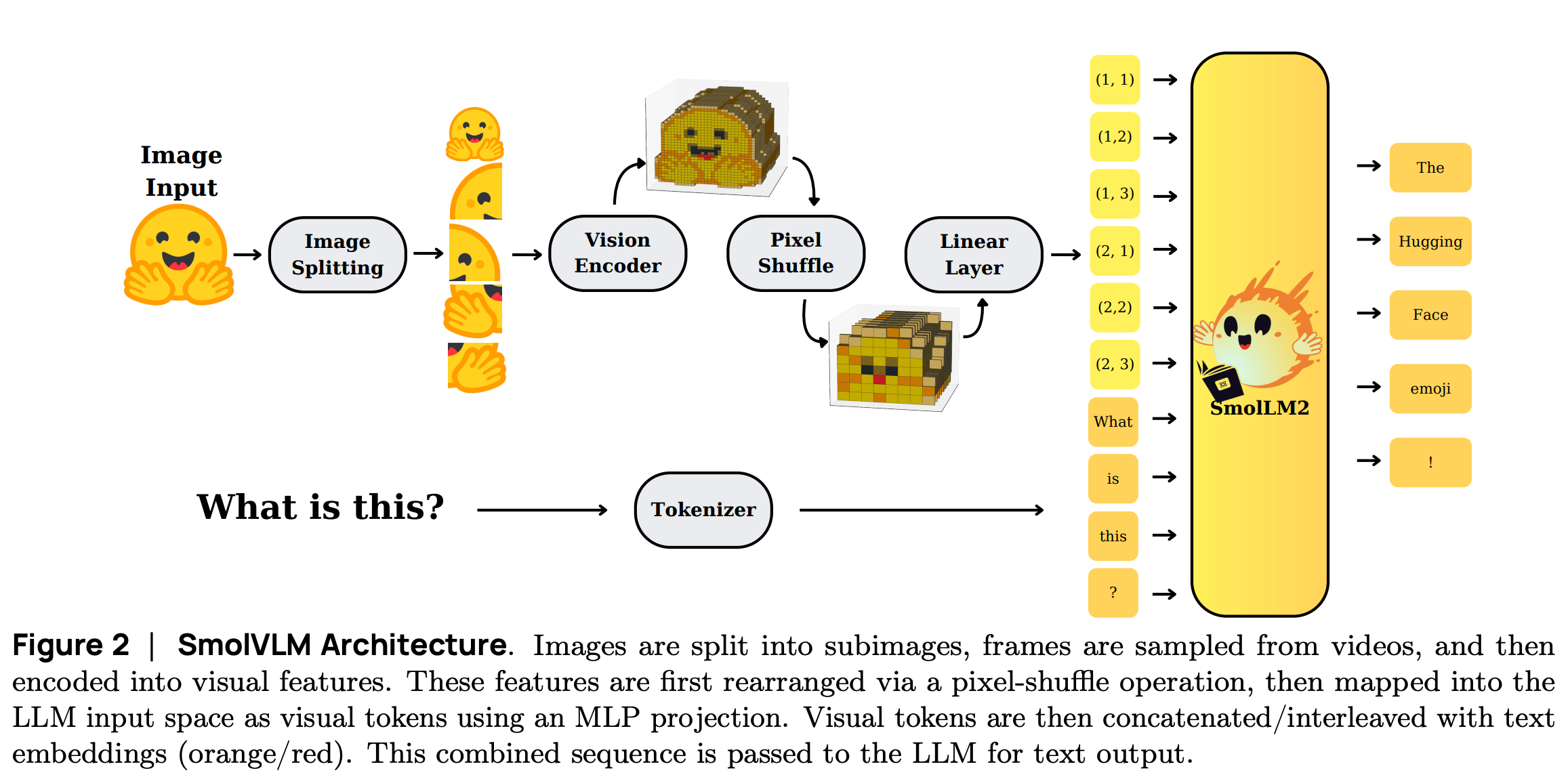
SmolVLM keeps this basic layout, with a few changes to reduce memory use and make inference cheaper. Images or video frames are encoded into visual features and combined with text embeddings before the mixed sequence enters the language model. In SmolVLM, the three parts are:
- Vision Model: a SigLIP encoder processes input images or video frames and extracts visual features.
- Projector: Pixel Shuffle first compresses the visual features, which are then projected into the LLM’s embedding space.
- LLM: based on SmolLM2, it consumes the mixed visual-text sequence and generates the response.
Image Splitting in SmolVLM
SmolVLM splits an image before visual encoding. Here, splitting does not mean object-level semantic segmentation. The model divides the image into a regular grid based on its dimensions and input limits, while also keeping a low-resolution thumbnail of the whole image. The crops preserve local detail; the thumbnail preserves the broader context.
Encoding the full image directly: resizing a high-resolution image such as 1920x1080 straight to the encoder’s fixed 512x512 input can erase small text and chart details.
Regular tiling: dividing the resized image into a fixed grid and encoding each crop separately preserves more local detail without changing the encoder’s input size.
Vision Encoder
SmolVLM’s vision encoder is based on SigLIP, short for Sigmoid Loss for Language-Image Pretraining. SigLIP uses a Vision Transformer architecture and learns compact visual representations through image-text pretraining. Unlike CLIP’s global softmax, SigLIP computes a sigmoid loss independently for each image-text pair. It does not need to normalize all similarities across a batch and is therefore less dependent on large batch sizes.

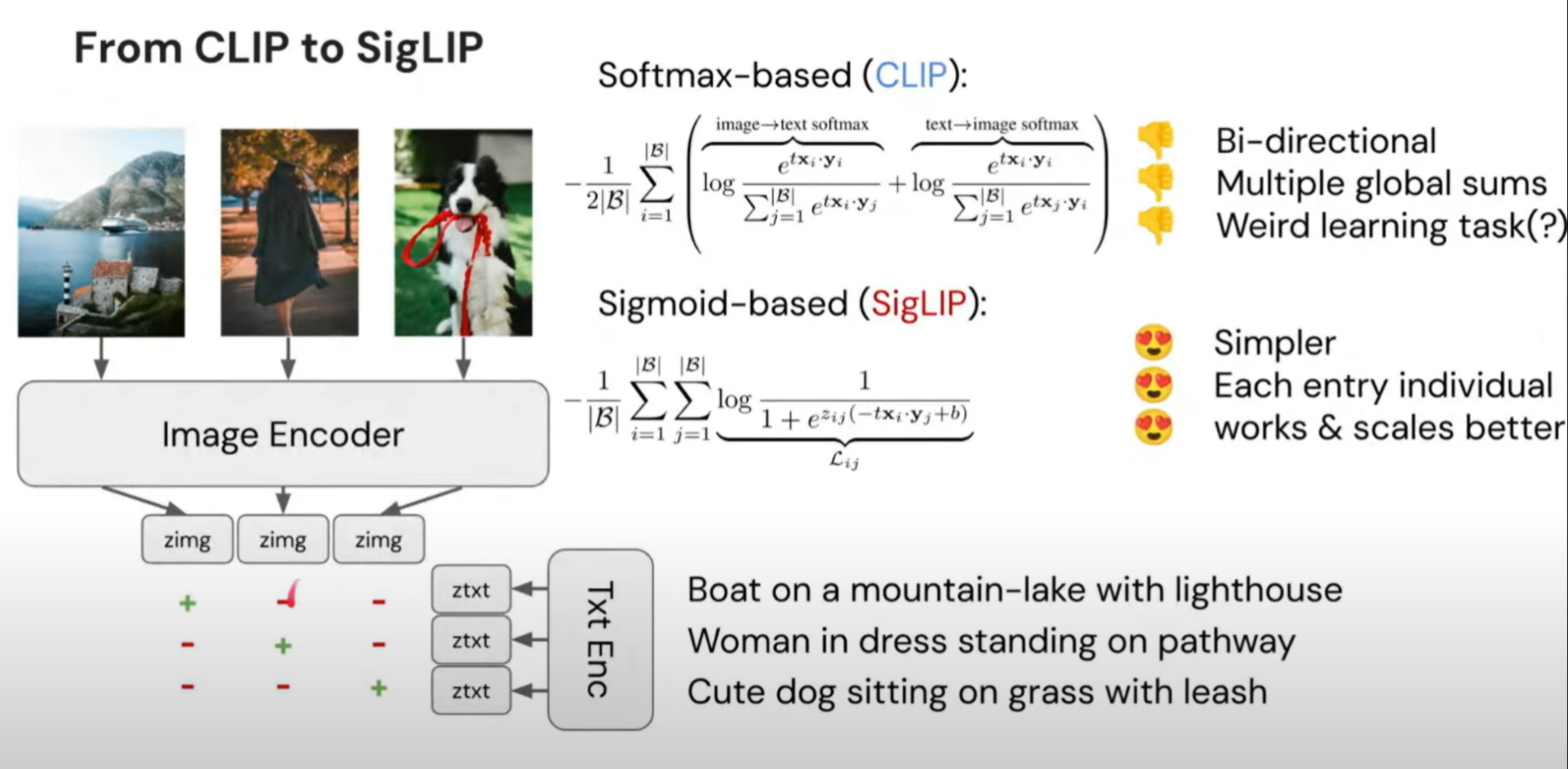
| Dimension | CLIP | SigLIP |
|---|---|---|
| Introduced | OpenAI, 2021 | Google, 2023 |
| Training objective | Applies global softmax normalization to image-text similarities within a batch | Computes sigmoid loss independently for each image-text pair |
| Batch-size dependency | Usually needs a large batch to provide enough negative samples | Does not depend on global normalization and remains effective with smaller batches |
The SigLIP variant depends on the SmolVLM model size and its intended use:
SigLIP base patch-16/512: approximately 93M parameters with 16x16-pixel patches. It is used by SmolVLM-256M and SmolVLM-500M for resource-constrained devices.
SigLIP-SO400M: approximately 428M parameters with 14x14-pixel patches. It is used by SmolVLM-2.2B for higher-performance scenarios.
SmolVLM’s experiments show that a larger vision encoder does not automatically make the whole model better. Paired with a 135M language model, the 428M vision encoder actually performed worse than the 93M version. Paired with a 360M language model, it improved performance by 11.6%, but increased the total parameter count by 66%.
For a compact VLM, scaling the vision encoder alone may not be a good trade-off. If the language model is too small, it may not be able to make full use of the additional visual features.
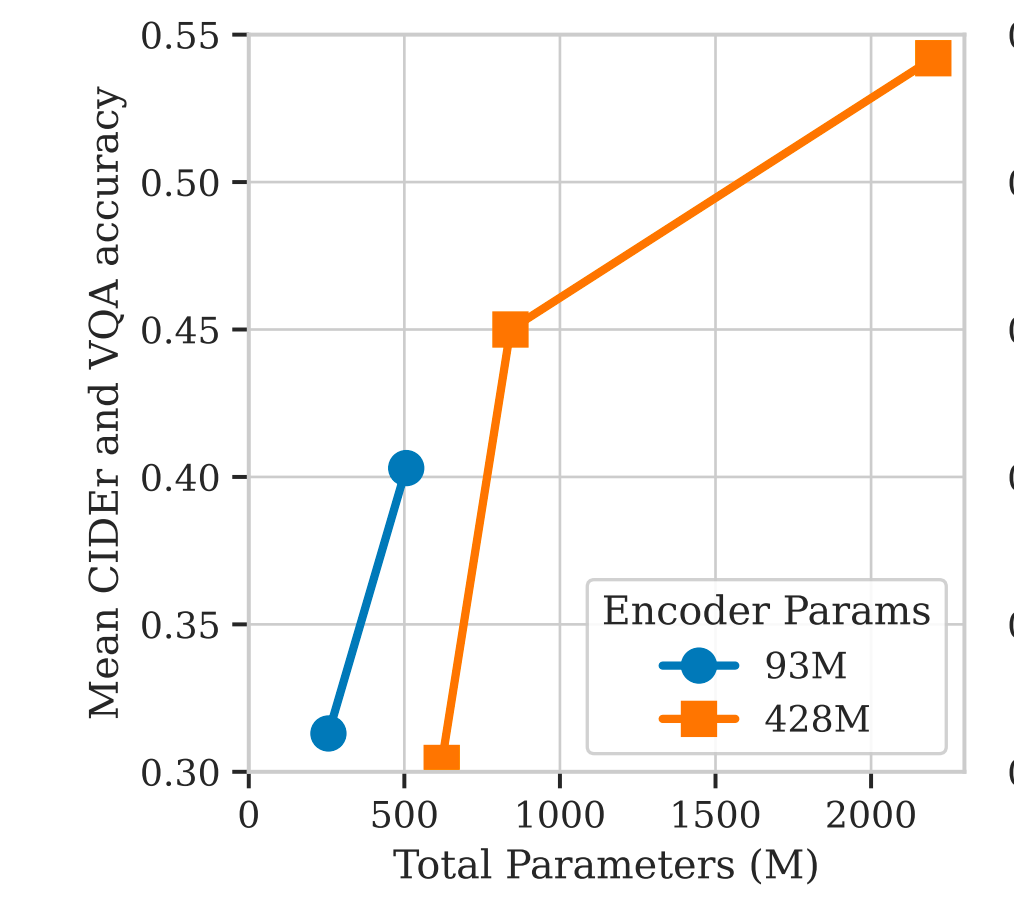
This trade-off also explains why compact VLMs often devote more parameters to the language model than to the vision encoder.
Large Language Model
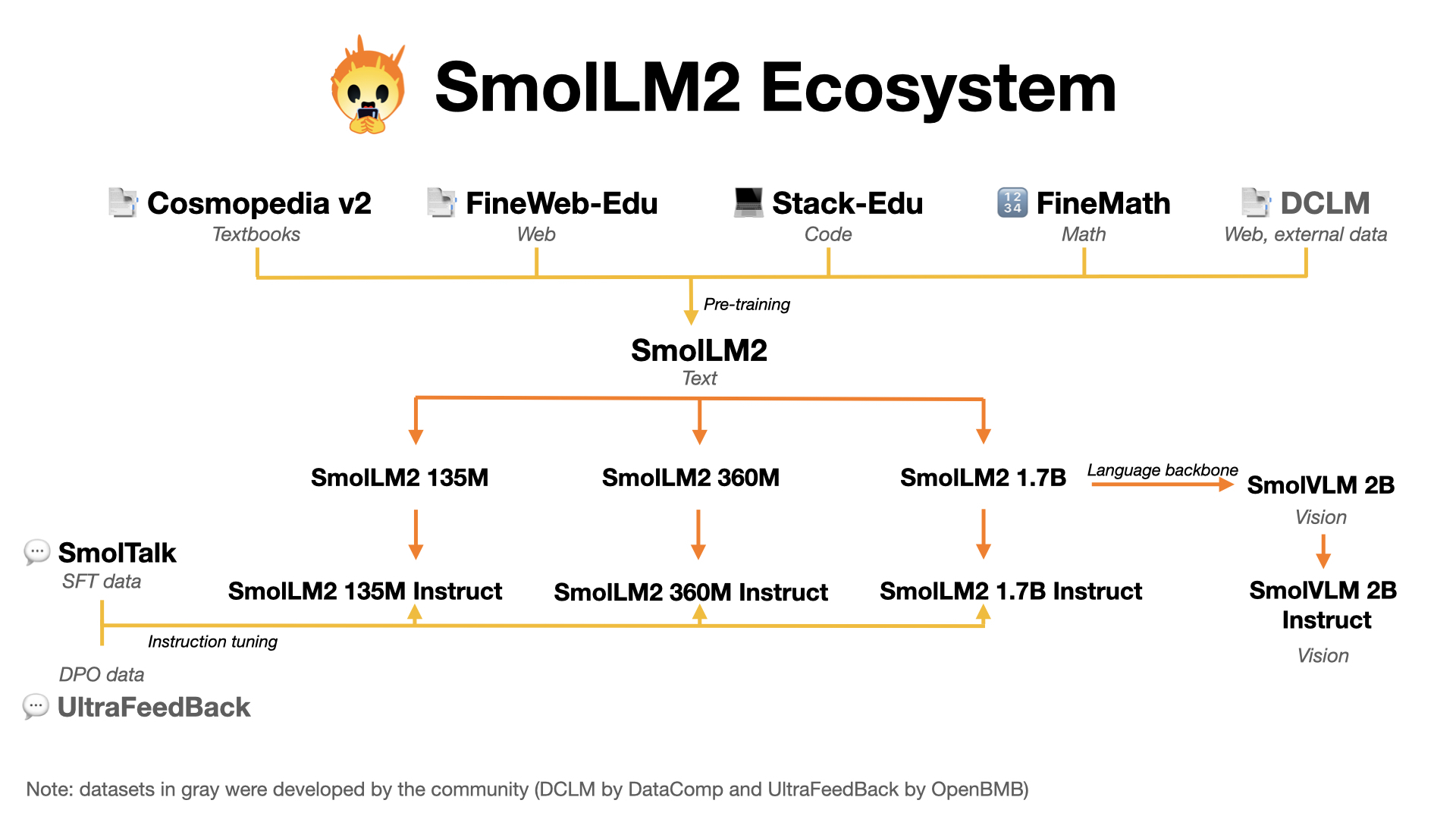
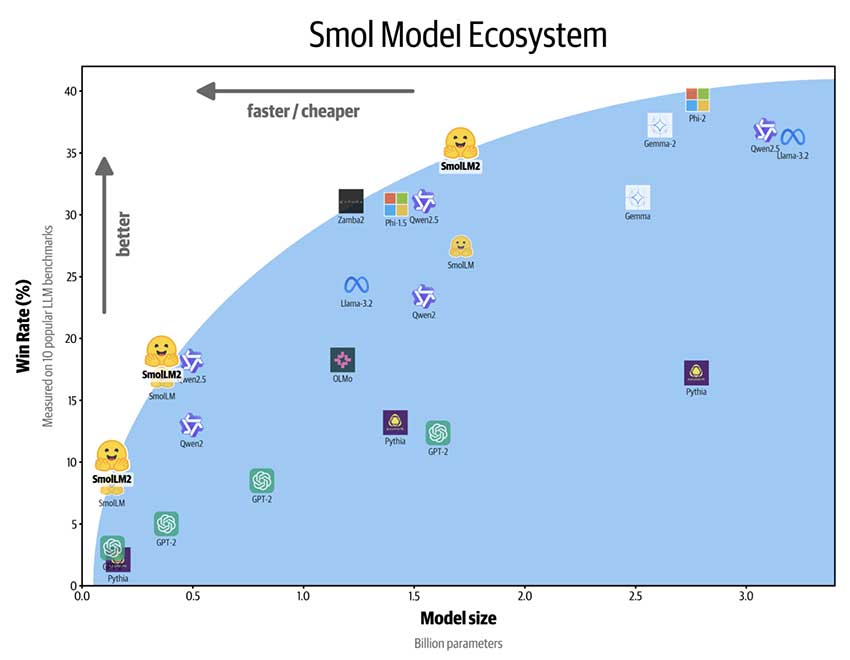
Hugging Face’s SmolLM2 family contains 0.1B, 0.3B, and 1.7B models designed for on-device applications. Like SmolLM1, it focuses on compact models for situations where latency, privacy, and limited hardware matter.
SmolLM2-1.7B was trained on roughly 11 trillion tokens from datasets including FineWeb-Edu, DCLM, and The Stack. The corpus is primarily English, with additional work on text rewriting, summarization, and function calling. Its published training recipe is notable in several ways:
Long training runs: despite the model’s small size, it was trained on far more tokens than was common for earlier models of a similar scale.
Multi-stage training: training began with large-scale web text, then gradually introduced high-quality mathematics, code, and instruction data while dynamically adjusting the data mixture.
Dataset evaluation and selection: web, code, mathematics, and instruction-following data were evaluated separately, and the results guided the composition of the training set.
Dataset augmentation: FineMath, Stack-Edu, and SmolTalk were added to strengthen mathematical reasoning, coding, and instruction-following capabilities, respectively.
Online rebalancing: dataset proportions were continuously adjusted according to the model’s performance on key benchmarks.
Projector
SmolVLM’s projector takes the SigLIP features after Pixel Shuffle and
maps them into the language model’s embedding space. Pixel Shuffle
expands each visual token’s feature dimension by a factor of
This is a small, inexpensive layer. Its job is mainly to align dimensions and feature spaces, so some detail may be lost during projection, and it does not explicitly model richer cross-modal relationships.
Pixel Rearrangement
Pixel Shuffle was originally introduced for image super-resolution. It reshapes a feature map by rearranging its spatial and channel dimensions without discarding elements. SmolVLM runs the rearrangement in the opposite direction: some spatial information is folded into the channel dimension, leaving wider feature vectors and a shorter sequence of visual tokens for the language model.
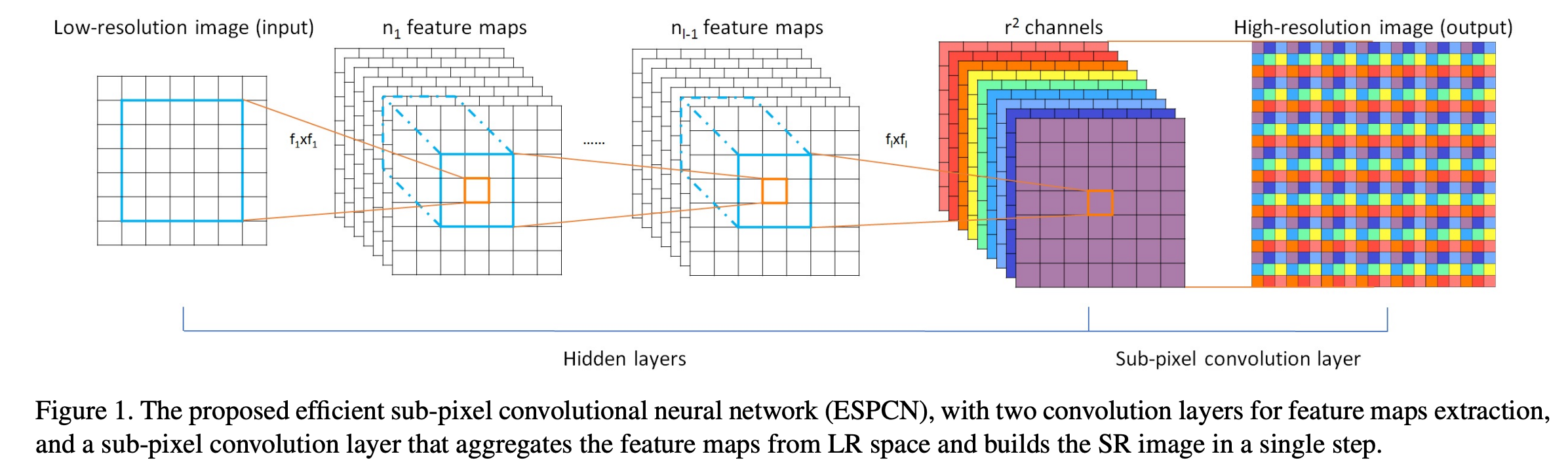
For standard Pixel Shuffle, the shape transformation can be written
as
B: batch size.
sub-units, where is the scaling factor. H: image height.
W: image width.
The expression above describes the super-resolution direction.
SmolVLM uses the inverse rearrangement, which can be written as
For example:
In SmolVLM-256M, a 512x512 image is divided into 64 independent image blocks. Each block is encoded as one visual token, so the entire image can be represented with only 64 tokens. This design substantially reduces the number of visual tokens entering the language model, lowering memory usage and speeding up inference.
SmolVLM-256M uses SigLIP base patch-16. A 512x512 input with 16x16 patches initially produces 1,024 visual tokens. Pixel Shuffle then compresses the sequence to 64.
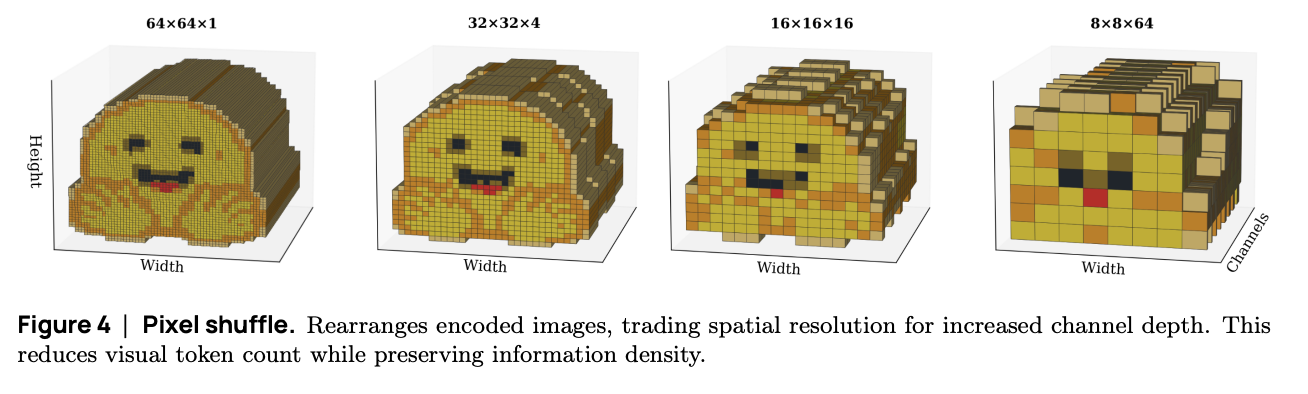
The 1,024 patches form a 32x32 spatial grid. Reducing
the token count from 1,024 to 64 gives a compression ratio of:
In a Transformer, attention computation usually grows quadratically with sequence length. If the token sequence length is Len and the feature dimension is Dim, then
and have shape , while the attention matrix has shape . During inference, the model generates and caches Key and Value vectors in the KV cache. The size of this cache is directly proportional to the input sequence length and batch size.
By the time they reach the language model, the visual tokens have been flattened into a one-dimensional sequence. Their two-dimensional relationships are carried mainly by the vision encoder and positional information; the LLM itself receives an ordered sequence of visual features. The SmolVLM paper describes this process in more detail.
Inference Framework

llama.cpp
is a C/C++ inference framework for running large models locally across a
wide range of hardware, with few dependencies.
Its main features include:
A pure C/C++ implementation with no external dependencies.
Native support for Apple silicon, with extensive optimization through ARM NEON, Accelerate, and Metal.
Architecture-specific instruction-set support for x86 and RISC-V.
Support for 1.5-bit, 2-bit, 3-bit, 4-bit, 5-bit, 6-bit, and 8-bit integer quantization, improving inference speed while reducing memory use.
Custom CUDA kernels for running large language models on NVIDIA GPUs, HIP support for AMD GPUs, and MUSA support for Moore Threads GPUs.
Vulkan and SYCL backends.
Hybrid CPU+GPU inference, allowing models larger than the available VRAM to be partially accelerated.
Our integration uses llama.cpp’s multimodal path, which exposes the language model, vision projector, and mixed image-text input through the same set of interfaces. The framework runs on both iOS and Android, so the model code can be shared while each client keeps only a thin platform-specific layer.
GGUF Model Files
GGUF is the model interchange and storage format used by the GGML ecosystem. Designed for fast loading and inference, it succeeds the GGML, GGMF, and GGJT formats. A GGUF file can hold model structure, configuration, and weights, while leaving room to extend its metadata without breaking compatibility. It is now used by many local inference tools beyond llama.cpp.
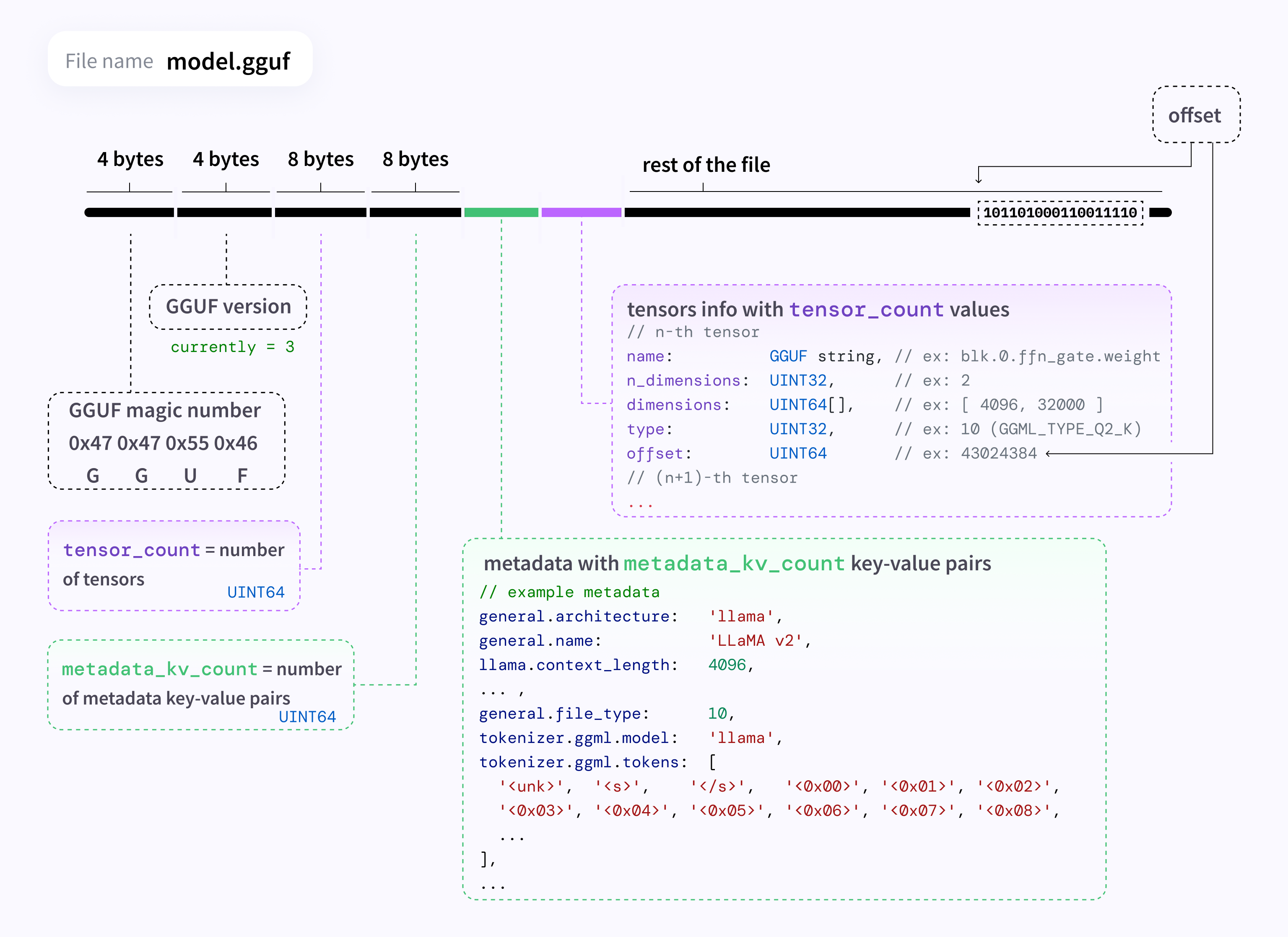
A GGUF file has three main sections: the header, metadata, and tensor data.
Header: contains the
GGUFmagic number and format version, allowing the loader to identify the file and handle version differences.Metadata: stores the model architecture, name, embedding dimension, vocabulary, tensor information, and other configuration as key-value pairs. The loader therefore does not need a separate configuration file.
Tensor data: stores weights, biases, and normalization parameters contiguously. Quantized models also store low-precision data and the information required for dequantization, organized into types such as
Q4_0,Q5_K,Q8_0,F16, andF32. Tensors are usually aligned to specific byte boundaries for efficient memory mapping and loading.
Compared with Safetensors, GGUF is more self-contained for inference. Alongside the weights, it can store the model architecture, quantization method, vocabulary, and other metadata. Safetensors also supports file-level metadata, but the model configuration and tokenizer usually live in separate files. A multimodal model may still keep its language model and vision projector in separate GGUF files.
Self-describing: weights, architecture, and quantization information are kept within the same model component, so the loader can read the required parameters directly from the file.
Memory mapping: tensors are aligned according to defined rules and can be mapped with
mmap, avoiding a full copy of the model at startup.Extensible: metadata uses a key-value structure, so new fields can be added without redesigning the entire file format.
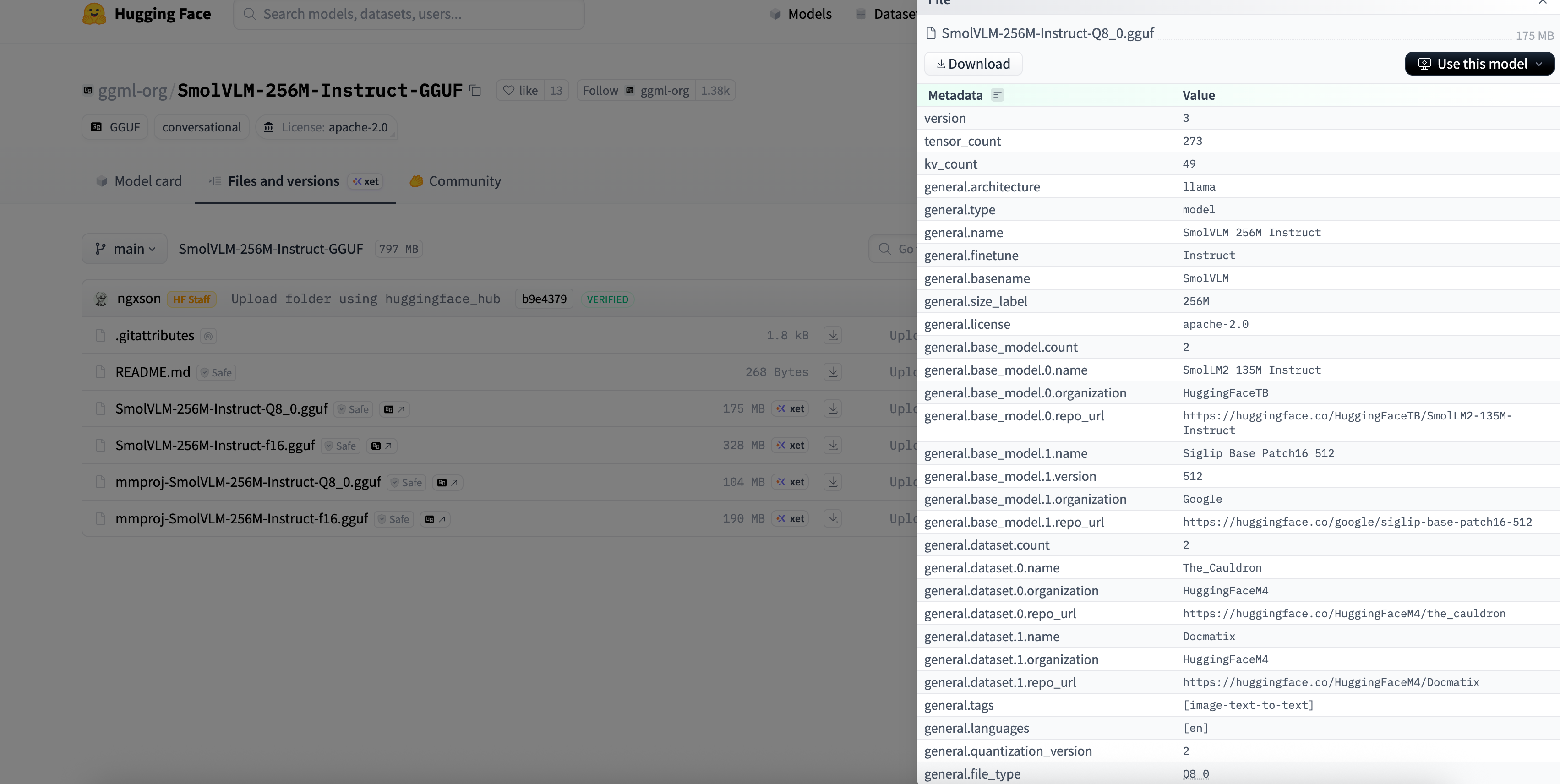
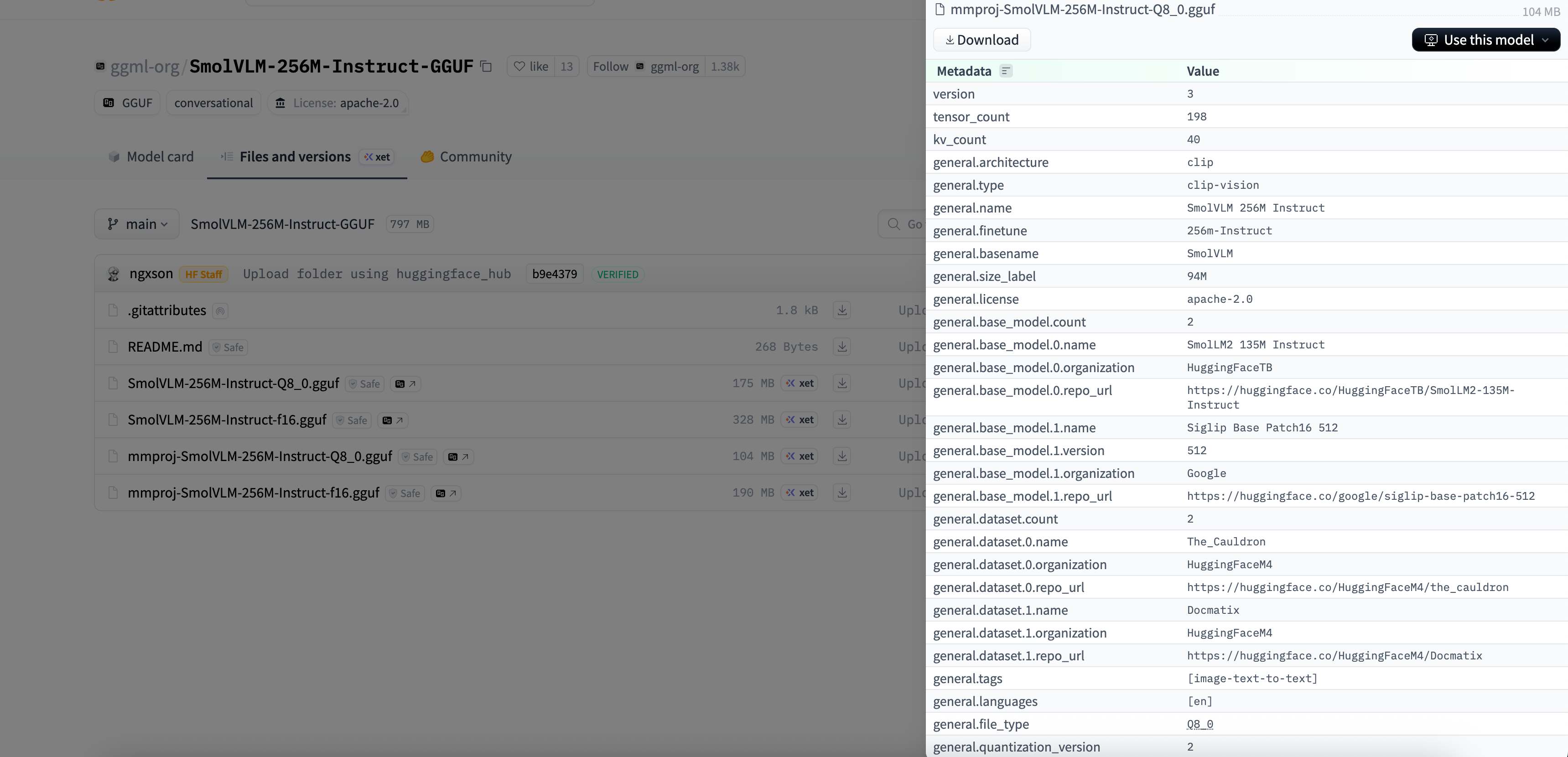
For a concrete example, the SmolVLM-256M-Instruct-GGUF repository on Hugging Face shows the metadata and tensor descriptions for both the language and vision models.
Inference Flow
With the model architecture out of the way, we can start at the
mtmd-cli.cpp entry point and trace where image splitting,
visual encoding, Pixel Shuffle, and language-model inference happen in
code.
Loading the Models
llama.cpp initializes the multimodal CLI in the main()
function of mtmd-cli.cpp.
1 | int main(int argc, char ** argv) { |
common_params_parse() collects environment variables and
command-line arguments into common_params, downloads the
model if needed, and validates the resulting options. Model loading,
context creation, and inference all use this shared structure.
Building the Context
1 | int main(int argc, char ** argv) { |
The mtmd_cli_context constructor loads the language and
vision models, then initializes the model parameters, chat template,
vocabulary, and caches. It also creates the llama_context
used by the rest of the inference pipeline.
Prompt Processing
Chat templates vary between models. SmolVLM is based on the IDEFICS3 architecture, so its prompt must follow the official chat template. The template is also embedded in the model file and can be read when the model is loaded.
1 | <|im_start|> |
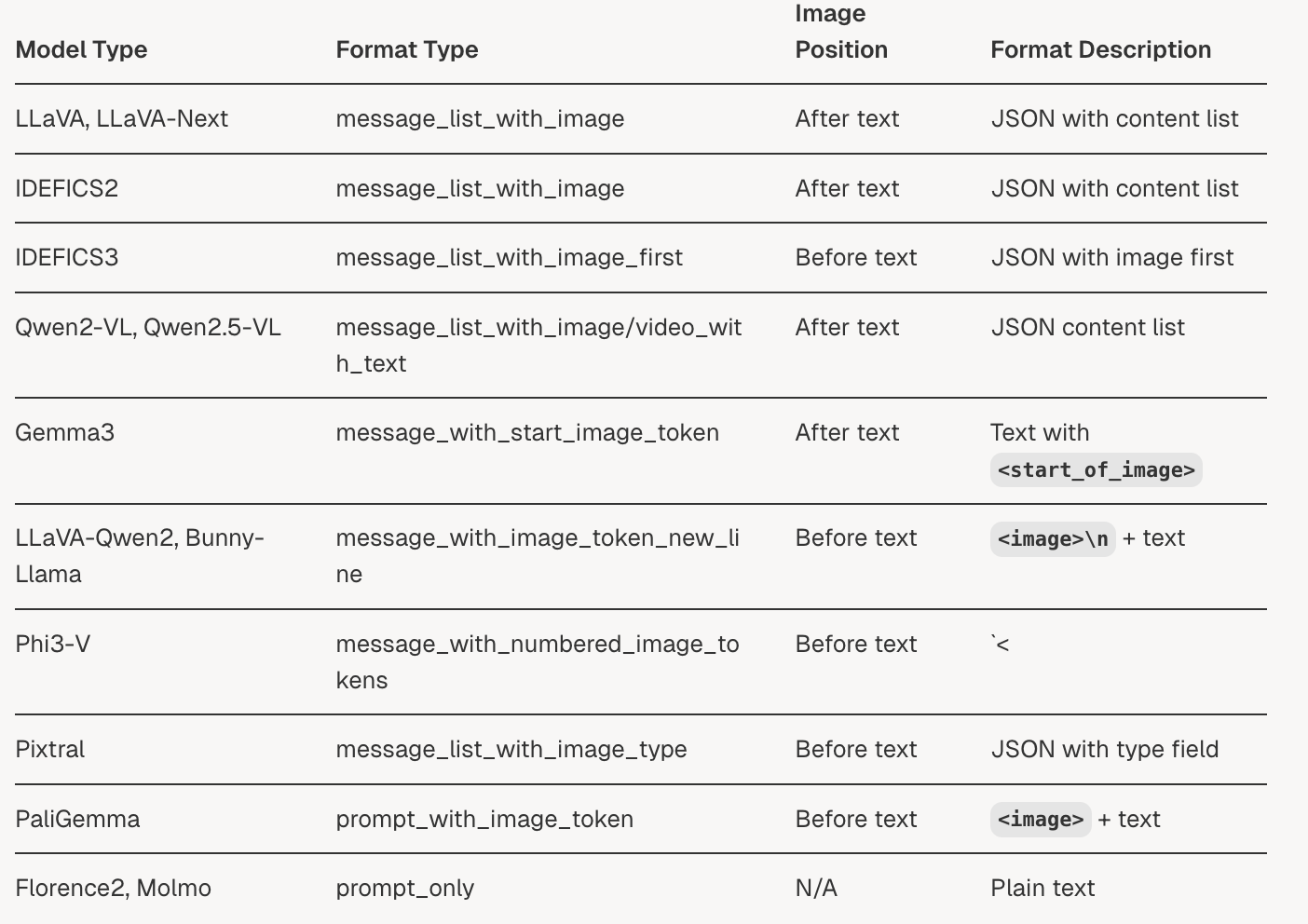
The order of the image marker, user prompt, and system prompt matters. Swapping the image and text positions can produce incorrect output.
1 | <|im_start|>System: You are a helpful assistant.<end_of_utterance> |
For SmolVLM, llama.cpp’s image marker can be set to
\<image\> to match the official template. The marker
is not converted into an ordinary token ID. It becomes a separate image
chunk and is replaced with image embeddings before the sequence enters
the Transformer.
1 | // mtmd.cpp |
In the llama.cpp revision used for this integration, the system
prompt and user prompt each call eval_message() instead of
being processed together.
1 | // mtmd-cli.cpp |

That revision did not append \<end_of_utterance\>
to the system prompt, so we added it:
1 | // llama-chat.cpp |
Prefill
For autoregressive models such as LLaMA and GPT, the initial pass over the complete input sequence is called prefill. It computes the hidden states, logits, and KV cache needed for generation.
1 | static int eval_message(mtmd_cli_context & ctx, common_chat_msg & msg) { |
Each call to eval_message() runs one prefill pass.
mtmd_tokenize() tokenizes the prompt and divides it into
chunks; mtmd_helper_eval_chunks() then runs the forward
pass.
Prefill Flow
The system prompt and user prompt each call
eval_message(), so prefill runs in two segments. This does
not change the final sequence as long as token positions remain
contiguous and the KV cache is extended in order. The first segment’s
logits_0 are not sampled; generation uses the logits from
the final chunk. The intermediate logits are still computed, even though
they are discarded.
mtmd_helper_eval_chunks() sends image and text chunks to
the model in sequence, handling visual encoding and text decoding
separately.
In this example, the system prompt becomes text chunk0;
one forward pass produces logits_0. The user prompt is
split into text chunk1, image chunk2, and text
chunk3, then fed to the model in that order. Only the final
text chunk’s logits_last are used for autoregressive
sampling.
Image Preprocessing in llama.cpp
SmolVLM divides an image into local crops before sending them through
the SigLIP encoder. Each crop is encoded into image embeddings. In
llama.cpp, this path starts in clip_image_preprocess().
1 | clip.h |
The code first sets overview_size for the global
preview. It then computes refined_size, the source image
scaled to the model’s limits, and derives grid_size, the
number of tiles needed at the target crop size.
In SmolVLM’s preprocessor_config.json,
size.longest_edge is 2048, which caps the longest edge
after scaling. max_image_size.longest_edge is 512, the
target size for each image passed to the vision encoder. A 1024x512
image, for example, is resized to 2048x1024 and divided into eight
512x512 crops. With the global preview, nine images are encoded in
total. The llama.cpp revision and vision GGUF used here did not store a
separate longest_edge value, so runtime preprocessing
produced only the global preview. To enable the full tiling path, the
corresponding longest_edge must also be loaded with the
vision model’s hyperparameters.
Llama Decode
llama_context::decode() is where the main inference work
happens. It accepts a batch of tokens, runs the Transformer forward
pass, updates the KV cache, and produces logits.
The call has four main steps:
- Build the computation graph
- Run the Transformer
- Write to the KV cache
- Produce logits
1 | int llama_context::decode(const llama_batch & batch_inp) { |
process_ubatch() builds the computation graph, binds the
inputs, dispatches the graph to the Metal backend, and saves the KV
cache generated in this pass. Once computation finishes, the logits are
copied asynchronously into the CPU-side
llama_context::logits.data buffer for sampling. I will
leave backend tensors and graph scheduling for a separate
discussion.
Autoregressive Decoding
Once prefill is complete, generation switches to autoregressive decoding. The model emits one token at a time, with each token conditioned on the prompt, the KV cache, and everything generated so far.
After prefill produces the logits for the first sampling position, the model samples a token, appends it to the batch, and runs the next decode pass. The loop continues until a stopping condition is reached.
1 | static int generate_response(mtmd_cli_context & ctx, int n_predict) { |
Summary
Images and text take different paths before they meet in the language model. An image is split and encoded, Pixel Shuffle shortens its visual-token sequence, and the projector maps the features into the LLM’s embedding space. Text is broken into tokens and chunks according to the chat template. Prefill merges both streams in prompt order and writes them to the KV cache; autoregressive decoding then generates the response one token at a time.
When the output looks wrong, I would check the chat template, image marker, and preprocessing parameters first. It is also worth verifying that every prefill segment advances token positions and extends the KV cache without a gap. Any one of these details can change the generated text, image-understanding quality, or memory footprint.

